Build any WordPress form in the block editor you already use — then let it do more. Branded emails, PDF generation, live pricing, and optional booking or Stripe checkout, all native to Gutenberg.
Solutions That Solve Real Problems
Most form plugins stop at "message sent." CraftForms adds what a form actually needs next — a branded email, a printable PDF, a live price estimate, and, if the use case calls for it, a booking calendar or a payment step.
-
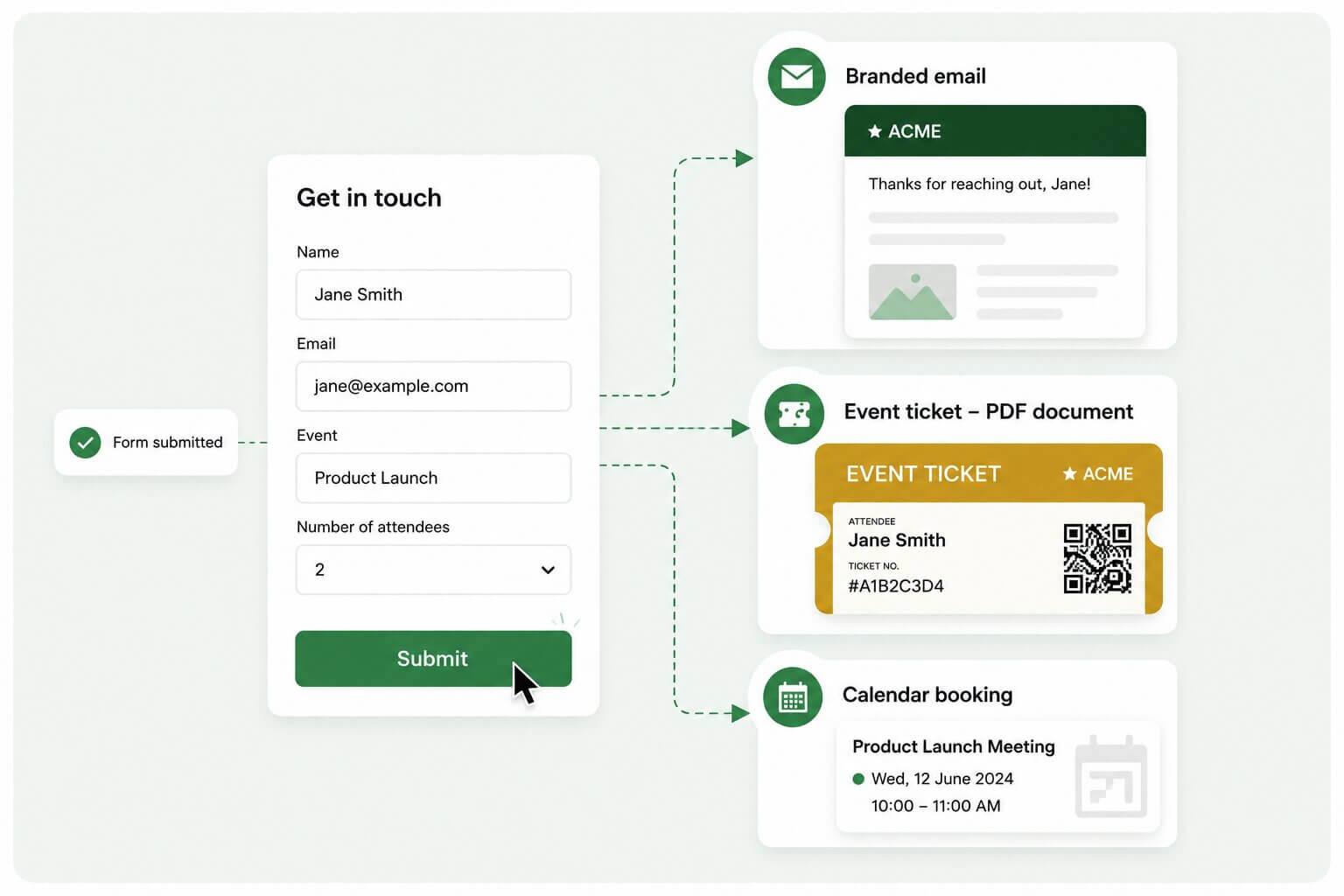 01 For service businesses, B&Bs, events & quizzes
A dead-simple form — with branded follow-through
A contact form shouldn’t need a developer or a stack of plugins — and a generic “someone submitted your form” email makes your business look amateur.
Build a reliable contact or service form in the block editor. Every submission is stored, sent as a branded HTML email you design yourself, and can be turned into a PDF — an invoice, an event ticket, a booking confirmation. Spin up an event sign-up, a quiz that prints results to PDF, or a fully working B&B booking form that emails a branded confirmation.
-
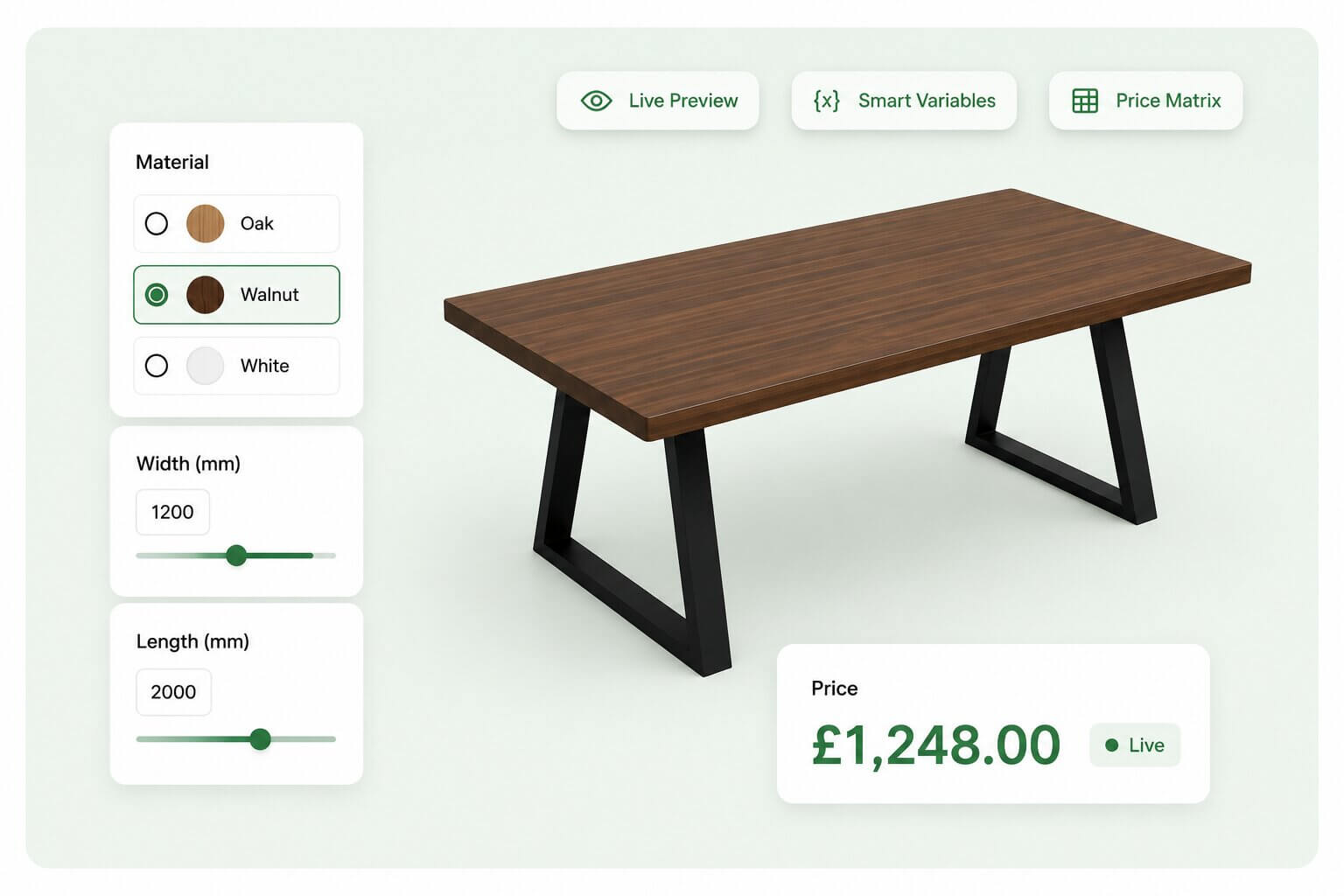 02 For printers, wallpaper, window/shutter & furniture makers
Bespoke configurators that price themselves
When products are priced by dimensions, materials and options, an “add to cart” button isn’t enough. Customers need to configure, see the price move, and preview what they’re ordering.
Build a visual configurator — standalone or wired into WooCommerce. Layered images recolor and swap as customers choose; an aspect-locked cropper trims artwork to the exact proportions you produce; table-based price matrices and formulas calculate the exact total on the server; live charts show the breakdown. The composited preview saves with the order.
See it live: -
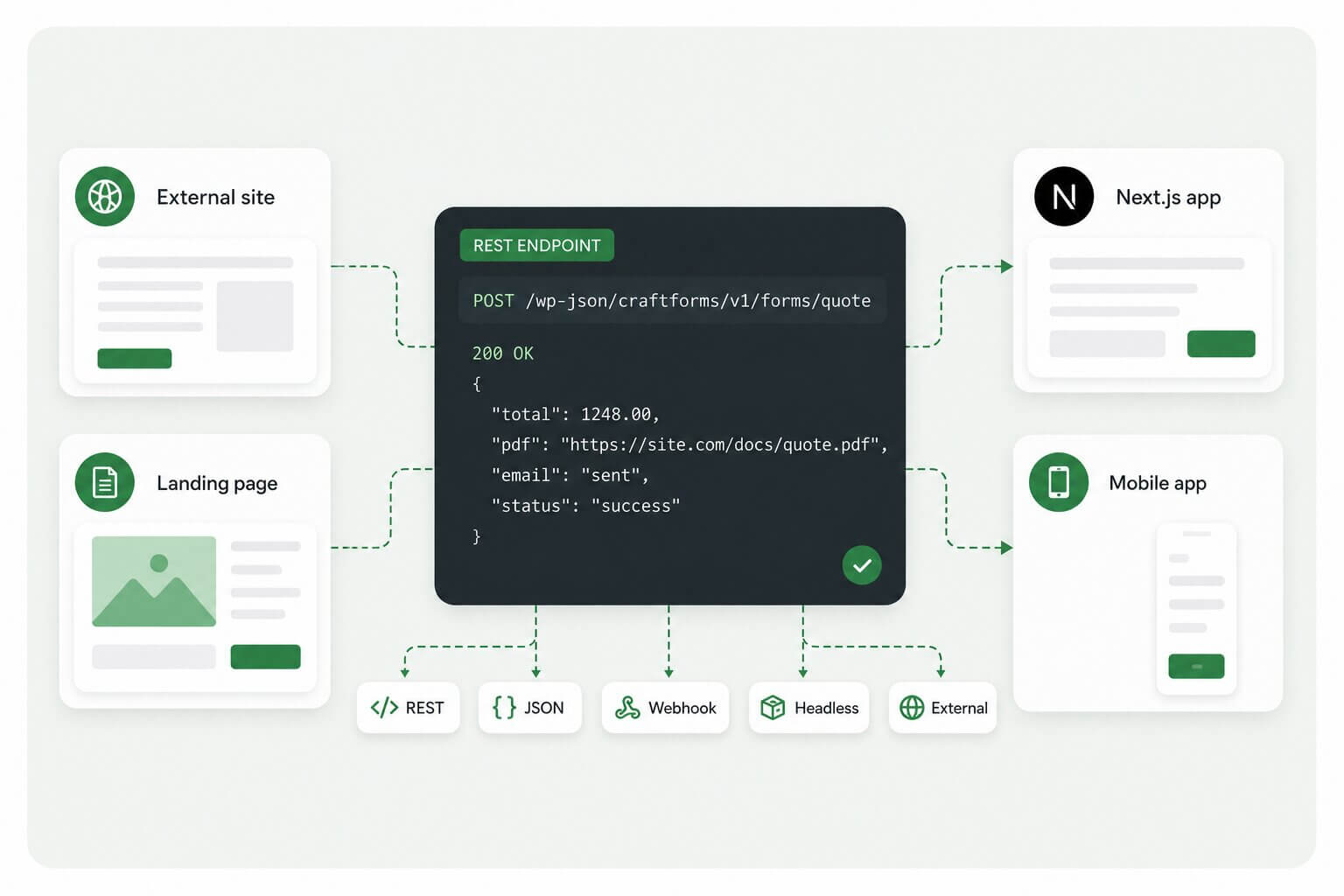 03 For developers running headless, static & external sites
Form logic in WordPress, served anywhere by API
Your front end is a static site, a Next.js app, or a landing page that doesn’t run WordPress — but you still want WordPress to own the form logic and the data.
Give any form a readable REST endpoint, allow external submissions from other domains, and lock it down with required header keys — a lightweight API key, no auth system to build. Or paste a self-sizing embed snippet onto any external page. Calculations, conditional logic, validation and spam scoring all run intact, off WordPress.
Features That Transform Your Forms Experience
Everything in the box — from the visual builder to email builder, PDFs and the API.
-
Visual Gutenberg form builder
Build forms in the block editor you already know — no shortcodes, no separate UI to learn.
-
Smart Variables & live pricing
Formulas, 2D price matrices and 50+ functions calculate the exact price on the server.
-
Layered-image configurator
Stack and recolor PNG layers that react live to every choice the customer makes.
-
Image cropper & filters
Aspect-locked cropping and filters that trim artwork to the exact proportions you produce.
-
Branded email designer
Design responsive HTML emails in Gutenberg with {field} variables — no marketing tool needed.
-
PDF builder & generation
Invoices, tickets and quotes rendered server-side, with QR codes and barcodes built in.
-
Booking datepicker & inventory
Date ranges, time slots and per-date availability that prevents double-booking automatically.
-
Conditional logic
Show, hide or disable any field or element by CSS selector — instantly, in the browser.
-
Stripe/PayPal integrations
Hosted checkout or inline card elements, with server-side price validation on every charge.
-
WooCommerce integration
Attach configurators and calculated prices to any product; options travel through checkout.
-
REST API & headless
Readable endpoints, external-domain submissions and self-sizing embeds for any front end.
-
Invisible spam protection
Behavioural scoring blocks bots with no CAPTCHA and no friction for real users.
-
SMTP manager & email log
Multiple servers, live delivery status and a full audit trail of every email sent.
-
Structured submission database
Every entry stored, searchable, sortable and exportable as CSV or JSON.
Loved by agencies, freelancers, and sellers
-
Technically brilliant, still easy to use
CraftForms is turning out to be one of my favourite forms plugins, with its almost unlimited WooCommerce customisation options, its fast easy and quick embed form option has powered up the ability to make payments and sales on static websites with customised PDF generators and email design from your secure back-end. Its technically brilliant while remaining easy to use and customise and the development speed is impressive.
-
Handles complex requirements seamlessly
Craft Forms is an absolute powerhouse! I am thoroughly impressed by its advanced capabilities and how seamlessly it handles complex requirements. The developer has done a phenomenal job crafting a tool that is easy to use but also exceptionally powerful. Highly recommended whether for standalone contact forms or advanced WooCommerce price calculations. Truly a top-tier plugin.
-
A good move from Uni CPO
Switched to CraftForms from Uni CPO for our print shop and it's been a good move. My favorite part is reusing one form across multiple products with the same options instead of building each one separately, plus the instant price calculation as you configure. Had a couple of annoyances with the file upload field (files getting mixed into the media library, no download link in the order email) and reached out to support not expecting much. Got a real, specific answer fast, and they're already working on both issues. That kind of support is rare.
-
Excellent support
Last couple of days, I created and improved a form with CraftForms. I had some minor issues and I shared them with Vitalii Kiiko via email. He was extremely kind and responsive every single time, he even pushed a minor update regarding a URL redirect issue. I have no words for his support, especially in comparison to other solutions I have tried through the years. I see CraftForms as my main and only form tool in the future, especially with the rapid way it evolves.
Simple, Transparent Pricing
Choose the plan that works best for you — or start free, no credit card needed.
INDIE
Up to 5 WordPress site activations
-
5 WordPress site activations
-
Annual updates & support
-
Email Templates
-
Booking & scheduling fields
-
Stripe checkout (via your own Stripe account)
-
PayPal checkout (via your own PayPal account)
-
All blocks & form starters
-
Priority email support
STARTUP
Unlimited WordPress site activations. Forever.
-
Unlimited WordPress site activations
-
Lifetime updates & support
-
Email Templates
-
Booking & scheduling fields
-
Stripe checkout (via your own Stripe account)
-
PayPal checkout (via your own PayPal account)
-
All blocks & form starters
-
Priority email support
Just want to try it first?
Community Version
Community Version includes the visual form builder, email templates, and SMTP server manager — free, forever. No credit card needed.
-
No submission limits
-
No plugin branding
-
Invisible spam protection
Try the full feature set on our live demo before you buy — no signup needed.
14-Day Money-Back Guarantee on all paid plans
Contact Us!
CraftForms Community
Connect with CraftForms users, share your forms, get expert tips, and be the first to hear about new features. Whether you're just getting started or a power user, our Facebook group is the place to learn, grow, and get your questions answered.
Frequently Asked Questions
Does CraftForms work with Gutenberg?
Absolutely. CraftForms is built from the ground up for the block editor — not retrofitted onto it. Every form is a native Gutenberg block, so you get the same drag-and-drop layout, inline editing, and block panel controls you already use for pages and posts. If you can edit a page in WordPress, you already know how to build a form in CraftForms.
Does CraftForms work with any WordPress theme?
Yes. CraftForms follows WordPress standards and inherits your theme's typography, colors, and spacing automatically. Both the Default and Modern form styles are theme-aware, so forms look consistent with the rest of your site without any CSS adjustments.
Do I need coding skills to use CraftForms?
No. The entire form builder — fields, settings, email templates, submit actions, conditional logic — is managed through the Gutenberg interface. For advanced users, Pro exposes a full REST API and CSS selector targeting in conditional logic, but nothing in the standard workflow requires touching code.
How does spam protection work?
CraftForms analyzes how each user interacts with the form before the submission reaches the server. It watches mouse movement, focus events, keystroke patterns, timing, and paste behavior, then assigns an invisible score. Bots that fill fields programmatically — without ever moving a mouse or pressing a key — are blocked at the server before any submission is processed. There is no CAPTCHA, no checkbox, and no friction for real users.
What happens if email notifications fail?
Every outgoing email is logged with recipient address, subject, timestamp, and delivery status. If delivery fails you see it immediately in the email log, with the full message body available for inspection — so no lead or submission confirmation is ever silently lost.
What submit actions are included in the free version?
Three actions are available in the free version, and you can stack them on a single form. Save submission stores every field value as a structured database record in WordPress, browsable and exportable from the admin panel. Send plain-text email notifies you or the submitter, with full field variable support in the recipient address, subject, and body. Send HTML email delivers a fully designed, branded email using a template you build in the Gutenberg Email Template designer.
Can I create price calculators and product configurators?
Yes — this is a core Pro feature. CraftForms Pro includes Smart Variables, a calculation engine that lets you write price formulas using field values, build 2D price matrix lookup tables, and display a live running total to the user as they configure options. The final price is always validated server-side on submission, so the amount charged matches the server-calculated total, not what the browser sent. Combine it with the Select and Radio fields' image and color swatch support and you have a full visual product configurator.
How do Smart Variables work?
Smart Variables are virtual values you define on the form — they don't appear as fields but are available everywhere: in price formulas, in conditional logic conditions, and in submission records and email templates. Expression variables let you write formulas using field values and 50+ built-in functions covering math, rounding, date arithmetic, string manipulation, and array operations. Price matrix variables are 2D lookup tables driven by two field values, importable and exportable as CSV, with exact-match, closest-up, or closest lookup strategies. Linked field variables map machine-readable option values to their human-readable labels so labels can be shown in the Info block and stored in records. Variables resolve in dependency order automatically, so one can safely reference another.
Can my forms accept payments?
Yes, through Stripe/PayPal integrations, available in CraftForms Pro. CraftForms connects to your own Stripe/Paypal account — payments are processed by Stripe/PayPal directly, and funds go straight to you. CraftForms never holds, routes, or has access to customer funds.
Does CraftForms support booking and scheduling?
Yes, via the Booking datepicker field in Pro. Three modes cover the most common scheduling models: hotel-style for checkin/checkout date ranges with minimum and maximum nights, blocked days of the week, and no-checkin/no-checkout day restrictions; fixed time slots for date-plus-time selection with a configurable slot interval, where unavailable slots are removed automatically based on confirmed bookings; and single-date for standard calendar-based date selection. All modes support advance notice requirements and bookable date window restrictions.
How does inventory and availability tracking work?
CraftForms Pro includes a Catalog where you define bookable services, rentals, or products as resources and attach them to forms. For booking resources, availability is tracked per date — and per time slot for fixed-slot bookings — and when a booking is confirmed the date is marked occupied automatically, no configuration required. For product resources, stock is tracked as a numeric quantity with a pre-submission availability check that prevents overselling before an order is saved. iCal sync keeps availability consistent with external platforms in both directions automatically.
Can forms register new WordPress users or create posts?
Yes, both are Pro submit actions. Register user maps form fields to WordPress user properties — username, email, password, first name, last name, display name, role, and custom user meta. Password generation is automatic if you omit a password field, and duplicate username and email detection prevents account collisions. Create post maps form fields to any post type — title, content, excerpt, author, publish date, slug, status, categories, tags, custom taxonomies, and custom fields. Use it for community submission forms, job boards, event listings, or any scenario where a form should produce content.
Does CraftForms have conditional logic?
Yes, in Pro. Conditions can show or hide fields, enable or disable fields, and show or hide any element on the page by CSS selector. You can test any field value or Smart Variable against a full operator set: equals, not-equals, is-empty, is-not-empty, one-of, any-of, all-of, none-of. Multiple conditions combine with AND or OR. All logic runs entirely in the browser — no round-trips, no latency. Users only see questions relevant to their previous answers, which shortens the perceived form length and improves completion rates.
Can I collect file uploads?
Yes, via the File upload field in Pro. CraftForms reads the real MIME type of every uploaded file server-side rather than trusting the browser-reported extension. A hard blocklist rejects executable and script file types regardless of what filename the user provides. Files are held in session-bound temporary directories until the form submits successfully, then imported automatically into the WordPress Media Library. Accepted file types and maximum file size are configurable per field.
Is there a REST API for headless or external integrations?
Yes. The free version includes a REST submission endpoint for every form. Pro unlocks the full API — form submission, submission management, email and SMTP management, CSV/JSON export — plus per-form configuration options: a custom readable endpoint slug, cross-origin submission support to accept POST requests from other domains, required request headers that act as a lightweight API key, and a custom form action URL for pointing the form at a completely external handler.
Can I sync availability with Airbnb or Booking.com?
Yes, via iCal sync in Pro. For inbound sync, paste the iCal feed URL from any external platform — Airbnb, Booking.com, Google Calendar, or any service that publishes a standard .ics feed. WordPress fetches it every hour and marks those dates as unavailable in CraftForms inventory; the datepicker shows them as disabled immediately. For outbound sync, CraftForms generates a private .ics feed URL per resource that external platforms can subscribe to and pull your confirmed bookings on their own schedule. Availability stays consistent in both directions without any manual work.
What is the difference between Free and Pro?
The free version is a complete, production-ready form builder with no submission limits and no plugin branding. It covers all standard field types, two form styles, invisible spam protection, three submit actions, a Gutenberg email template designer, SMTP configuration, email delivery logging, and a Contact Form 7 importer. Pro adds everything needed when a form is a step in a business process: Smart Variables and price calculation, conditional logic, file uploads, the booking datepicker, the full Commerce and Booking suite (Catalog, inventory, orders, Stripe/PayPal integration, iCal sync), the Register user and Create post submit actions, and the full REST API with cross-origin support and access-control options.