
Cost Calculator Builder Alternative: When Your Calculator Needs to Be a Whole Form
- Category
- Article
- Published
- Updated
- Reading time
- 10 min
- Tags
If Cost Calculator Builder does everything you need, keep it. It’s a good, focused tool. The reasons people look for an alternative are usually the same few: conditions cost money, prices live in a table, the estimate has to turn into a PDF quote or a booking, and the calculator sits next to a separate contact form plugin that doesn’t know about it.
The short answer: if your calculator is one part of a bigger job (a quote, an order, a booking), a form builder with a price engine is the better fit. CraftForms is one: it builds the calculator in the Gutenberg block editor, prices from formulas and 2D tables, recalculates the total on the server, and sends the result as a branded email, a PDF or a payment. If you need a multi-step wizard or map-based distance pricing today, stay on Cost Calculator Builder Pro, because we don’t have those yet.
A disclosure: we build CraftForms. Everything below about Cost Calculator Builder comes from Stylemix’s own plugin page, docs and pricing page, checked on 23 October 2026.
TL;DR
- Stay on Cost Calculator Builder if you want a standalone estimator with 100+ templates, a multi-step calculator, geolocation, promo codes or a sticky calculator bar.
- Switch if the price comes from a grid (width × height, tiers), if the estimate should become a PDF quote, an order or a booking with availability, or if you’re paying for a separate form plugin as well.
- Price: CCB Pro is $59 a year for one site, $299 a year for unlimited, or $749 lifetime unlimited. CraftForms is €50.99 a year for 5 sites, or €129.99 once for unlimited sites.
- Moving over: there’s no importer for CCB calculators, so you rebuild. Most elements map one to one (table below). The formula usually ports almost as is.
Why do people look for a Cost Calculator Builder alternative?
Cost Calculator Builder (CCB) is a calculator builder, not a form builder. You drop elements into a calculator, a Formula element adds them up, and the visitor sees a total. The free version has 10 elements, basic arithmetic and over 100 templates, and it’s on the WordPress plugin directory with 20,000+ active installs.
The friction starts when a calculator has to do more than show a number:
- Conditions are Pro. Showing or hiding a field based on an answer is the “Conditional System”, and it’s only in Pro. Most real quote calculators need it (“Deep clean?” → show the oven and fridge options).
- No price tables. CCB’s formula supports
if / else,round,pow,min,maxand friends, but there’s no lookup table. A banner priced by width band and height band becomes a long chain ofifs that someone has to edit every time a price changes. - The calculator isn’t your form. CCB’s “Share quote” form, orders dashboard and email templates handle the estimate. Your contact, booking and application forms still live in another plugin (CCB even ships a Contact Form 7 integration for this). Two plugins, two styles, two places to look for submissions.
- What happens after the total. Pro adds PDF entries and email templates. If you want a fully designed quote PDF, a booking with per-date availability, or a WooCommerce product page with a layered-image preview, that’s outside what CCB does.
- Agency licensing. Ten sites cost $119 a year; unlimited sites cost $299 a year or $749 lifetime.
None of these is a flaw if you don’t need it. They’re the points where an alternative earns its place.
Cost Calculator Builder vs CraftForms: feature by feature
| Cost Calculator Builder | CraftForms | |
|---|---|---|
| What it is | Calculator builder | Form builder with a price engine |
| Where you build | Own drag-and-drop canvas | Gutenberg block editor |
| Calculations in free version | ✅ + − × ÷ and a Formula element |
❌ (paid plans) |
| Conditional logic | Pro | Paid plans |
| Formula functions | if/else, round, ceil, floor, pow, sqrt, abs, MIN, MAX |
50+ functions incl. round, ceil, pow, min, max, date helpers, ternary ? : |
| 2D price table (width × height) | ❌ | ✅ Exact / Closest up / Closest, CSV import |
| Price checked on the server at submit | Not documented | ✅ |
| Multi-step calculator | ✅ Page breaker (Pro) | ❌ not yet |
| Geolocation / map distance | ✅ Pro | ❌ not yet |
| Promo codes / discounts | ✅ Pro | ❌ not yet |
| Repeater, file upload, image choices | Pro | Paid plans |
| Date and time picker | Pro | ✅ Booking Datepicker with per-date availability and iCal sync (paid) |
| Live chart of the result | ❌ | ✅ Pie / donut |
| Payments | Stripe, PayPal, Razorpay, cash (Pro) | Stripe, PayPal, Mollie, Square through your own accounts (paid) |
| Email after submit | Email templates (Pro) | Branded email designer (free) |
| PDF entries (Pro) | PDF designer with QR codes and barcodes (free); order documents (paid) | |
| WooCommerce | Price into checkout (Pro) | Product options, layered-image preview, cart edit, stock by option (paid) |
| Your other forms (contact, booking, applications) | Separate plugin | Same plugin |
| Embed on a non-WordPress site | ❌ | ✅ REST API and embeds (paid) |
| Templates | 100+ calculator templates | 33 form starters |
Two rows deserve a closer look.
Price tables instead of nested ifs
A print shop charges €48 for a 100 × 100 cm banner and €61 for 140 × 100. In CCB that’s a formula with an if per width band, nested inside an if per height band. In CraftForms you add a Table Smart Variable, pick the width and height fields as row and column, and paste the price grid (or import it as CSV). Set Table cell lookup strategy to Closest up and a 137 cm banner is priced from the 140 cm column.
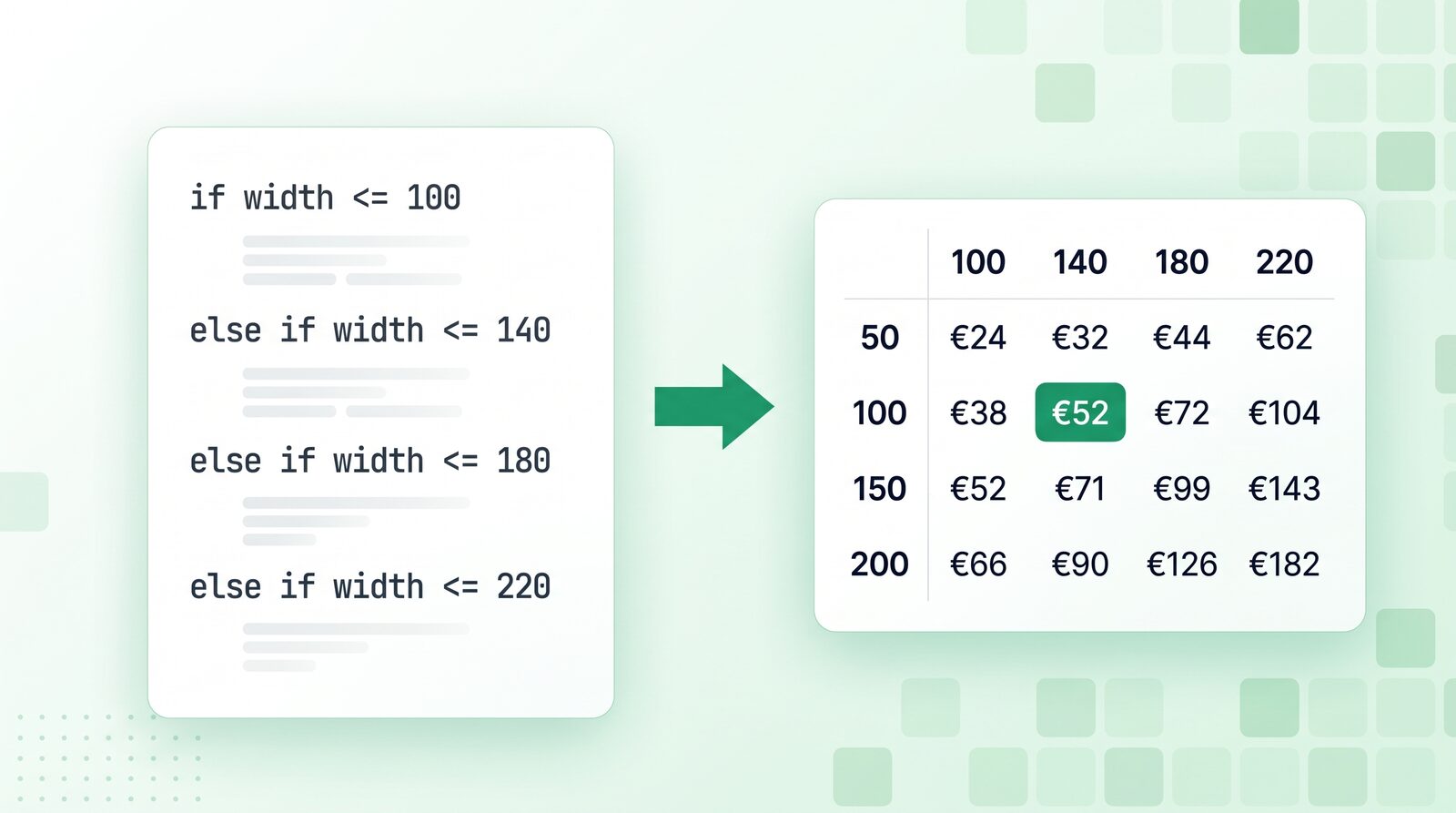
When the price list changes, you edit a cell. Nobody touches the formula. Our roller blinds configurator tutorial builds one end to end.
Server-side price check
If a calculator takes money, the browser total can’t be the amount you charge. Anyone with developer tools can edit it. CraftForms recalculates every Smart Variable on the server at submit, and the payment uses that figure. We couldn’t find this documented for CCB either way, so check with Stylemix if you take card payments from a calculated total.
How much does each cost?
Prices from each vendor’s pricing page on 23 October 2026. CCB is in US dollars and CraftForms in euros.
| You need | Cost Calculator Builder Pro | CraftForms |
|---|---|---|
| 1 site | $59/year or $149 lifetime | €50.99/year (Indie, 5 sites) |
| 5 sites | $119/year or $299 lifetime (10-site plan) | €50.99/year (Indie) |
| 10 sites | $119/year or $299 lifetime | €129.99 once (Startup, unlimited) |
| Unlimited sites | $299/year or $749 lifetime | €129.99 once (Startup) |
CCB’s pricing page shows a higher figure next to each price ($89, $229, $179, $449, $1,129). We’ve quoted the lower one, which was the price on offer when we checked.
Both CraftForms plans have the same features; the only difference is the number of sites and whether you pay yearly. The free Community edition has no submission limits and no branding, and it includes the email and PDF designers, but it doesn’t calculate.
When should you stay on Cost Calculator Builder?
Honestly, in these cases:
- You need a multi-step calculator now. CCB Pro’s Page breaker splits a calculator into steps. CraftForms has no step block yet.
- Price depends on distance on a map. CCB Pro’s Geolocation element picks two points on a map. We don’t have a distance field.
- You hand out promo codes. CCB Pro has discounts by date range or promo code. CraftForms has no coupon field.
- You want a template to start from in a minute. CCB ships 100+ calculator templates by business type. We have 33 form starters, and fewer of them are pure calculators.
- The calculator is the only form on the site, and you’re happy with how it looks.
How do you move from Cost Calculator Builder to CraftForms?
There’s no importer for CCB calculators (CraftForms imports Contact Form 7 forms and Uni CPO options, not CCB), so you rebuild. A typical estimator has 5–15 elements and one formula, so this is a short job. Here’s the element map:
| CCB element | CraftForms block |
|---|---|
| Text field | Text Input Field |
| Quantity | Text Input Field, type Number (or a Range Slider Field) |
| Dropdown / Image dropdown | Select Field / Radio Field with option images |
| Radio select / Image radio | Radio Field (options can carry an image, a colour and a price) |
| Checkbox / Image checkbox / Switch toggle | Checkboxes Field |
| Basic slider / Multi-range slider | Range Slider Field (turn on two handles for a range) |
| Date picker / Time picker | Booking Datepicker Field |
| File upload | File Field |
| Repeater / Group | Repeater Field / Options Group |
| HTML / Divider | Any core block (Paragraph, Separator…) |
| Formula (total) | A Smart Variable shown in an InfoBlock |
| Geolocation, Page breaker | No equivalent yet |
1. Rebuild the fields
Create a form, add the blocks from the table, and give each field a short name (bedrooms, bathrooms, clean_type). Those names are what the formula uses.
2. Port the formula
Most CCB formulas port with small changes. Say a cleaning estimator in CCB looks like this (element names simplified):
if (clean_type == 2) { (bedrooms * 25 + bathrooms * 15) * 1.4 } else { bedrooms * 25 + bathrooms * 15 }
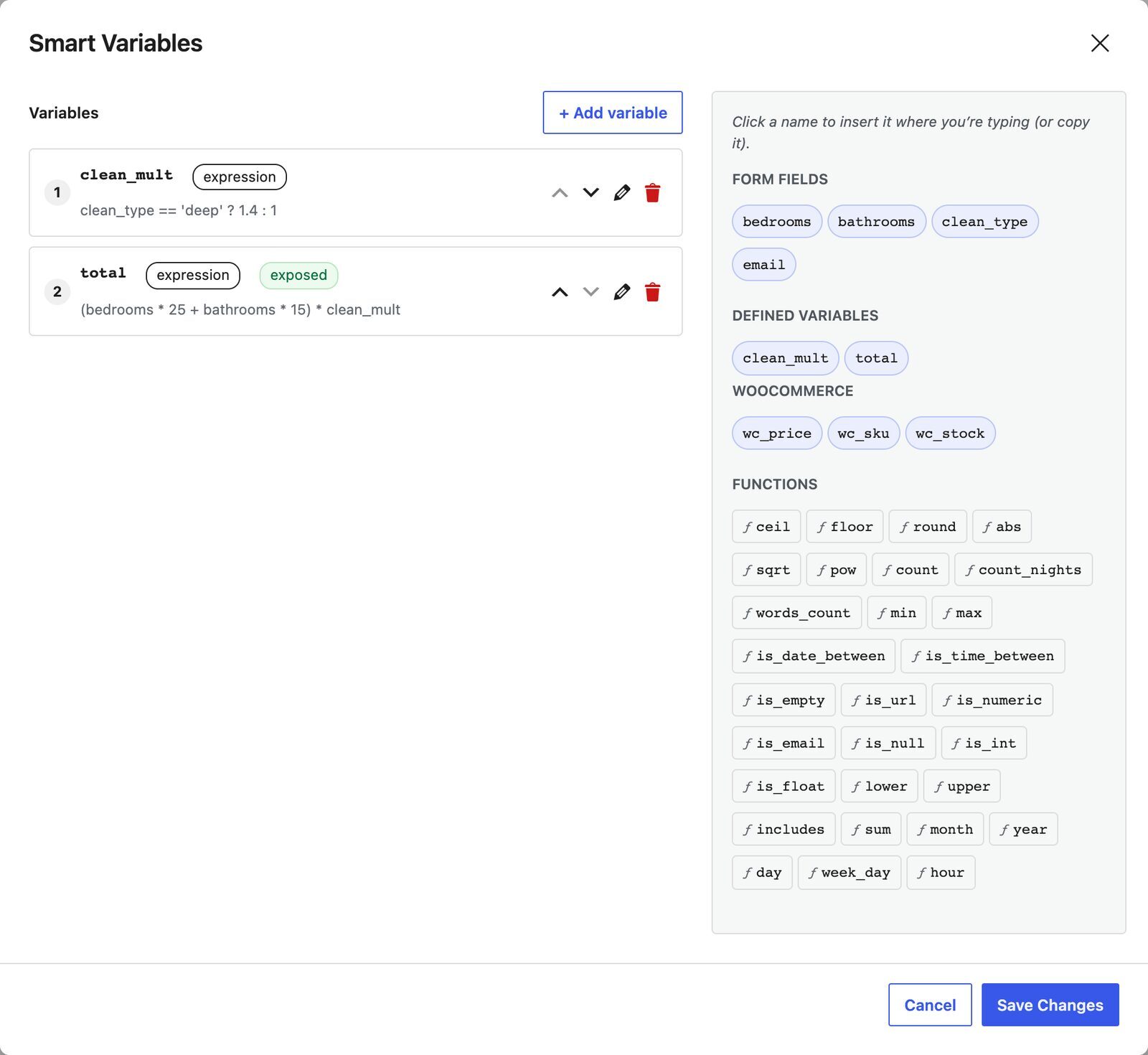
In CraftForms, open Manage Smart Variables and split it into two Expression variables. The if / else becomes a one-line ternary:
clean_mult = clean_type == 'deep' ? 1.4 : 1
total      = (bedrooms * 25 + bathrooms * 15) * clean_mult
Turn on Expose as field variable for total, then open Manage Price Formula and set the formula to total. The price is rounded and formatted for you, so there’s no need for round().
MIN and MAX become min() and max(); round, ceil, floor, pow, sqrt and abs keep their names. One trap: in CraftForms ^ is bitwise XOR, not power, so use pow(a, b) or a ** b.
If several CCB ifs were really a price list, replace them with a Table variable instead of porting them.
3. Show the total
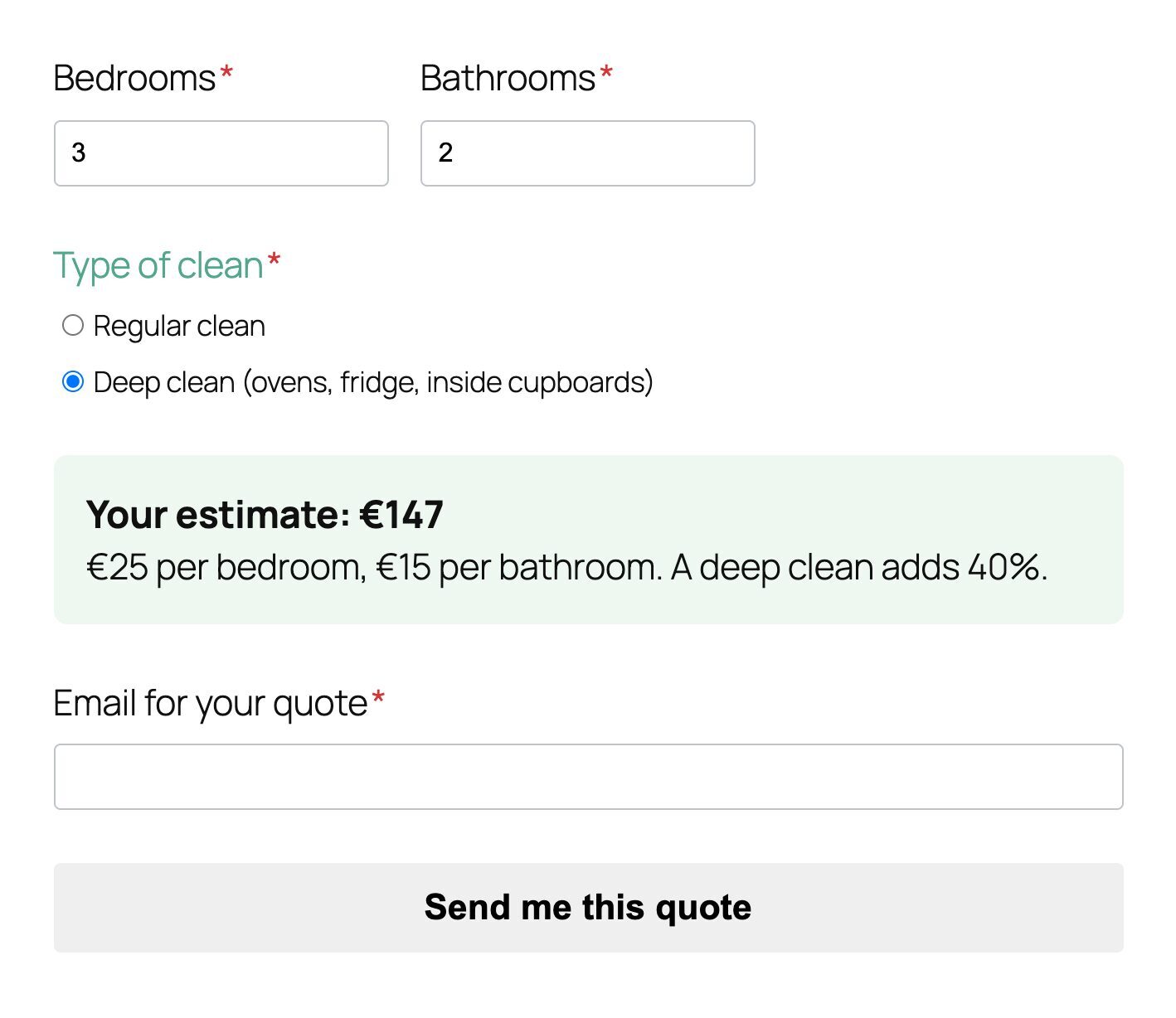
Add an InfoBlock and write Your estimate: €{{field.total}} in it. It updates as visitors type. If the breakdown matters, a Chart block can split the total into parts as a pie or donut (how to build a calculator with a live chart).
4. Decide what happens on submit
This is the part CCB handled with its quote form and orders dashboard. In CraftForms it’s the form’s submit actions: save the submission, send a branded email to the customer and to you, attach a PDF quote generated from the form, or take a Stripe or PayPal payment for the total. The price formula’s result is saved with every submission and is available in the email and PDF as {{email.price}}.
5. Swap the shortcode
Replace the CCB block or shortcode on the page with the CraftForms form, test a submission end to end, then deactivate CCB.
FAQ
Is there a free alternative to Cost Calculator Builder?
For calculations in a free version, Calculated Fields Form is the strongest option: unlimited calculated fields and conditional dependencies, free. CraftForms’ free edition builds the form, emails and PDFs, but calculations are in the paid plans. Our roundup of WordPress calculator form plugins compares seven options.
Does Cost Calculator Builder have conditional logic in the free version?
No. The Conditional System (show, hide, enable or disable fields based on input) is a Pro feature.
Can I import my Cost Calculator Builder calculators into CraftForms?
Not automatically. Rebuild the elements using the map above and port the formula into a Smart Variable. Most formulas need only small syntax changes.
Can a WordPress cost calculator use a price table?
Yes, with a plugin that has lookup tables. CraftForms has a Table Smart Variable with Exact, Closest up and Closest matching, and CSV import. CCB doesn’t have one; you’d write the grid as if statements.
Which is cheaper for an agency?
For unlimited sites, CraftForms Startup is €129.99 once. CCB Pro unlimited is $299 a year or $749 lifetime.
The short version
Cost Calculator Builder is a good calculator. If the calculator is the whole job, keep it. If it’s the start of a quote, an order or a booking, you want the calculator inside the form that does the rest.
Try CraftForms: build the form free, then switch on the maths with Indie or Startup.