
Uni CPO Alternative: Migrate Your Product Options and Formulas to CraftForms
- Category
- Tutorial
- Published
- Updated
- Reading time
- 10 min
- Tags
The short answer: if you’re looking for a Uni CPO alternative, you don’t have to rebuild your configurators by hand. CraftForms has a built-in migration tool that scans your WooCommerce store, finds every product that uses Uni CPO, and rebuilds each one as a CraftForms form. Fields, option prices, Non-Option Variables, price formulas, conditional fields and imagify layers all come across. Your Uni CPO products are left untouched, so you can check the result before you switch anything off.
TL;DR
- Go to CraftForms → Settings → Uni CPO Migration, click Scan & analyze, review the table, then Migrate.
- By default each product is copied to a new draft product with the CraftForms setup. The original keeps working as it is.
- Products with the same set of fields share one form, so 40 near-identical products don’t become 40 forms.
- It converts fields, option prices and swatches, NOVs, price and weight formulas (including rule-based ones), shipping-class rules, field conditions and imagify/colorify layers.
- It doesn’t convert the matrix field, Google Map, distance-by-postcode, font preview, extra cart buttons, or dimension formulas. The Notes column lists each one per product.
- The tool needs CraftForms Pro, WooCommerce, and Uni CPO still active while you migrate. It’s in beta, so check every migrated product before it goes live.
I built Uni CPO. For years it was how I’d answer “can WooCommerce price this by width and height?”, and a lot of you built real businesses on it: print shops, blinds, signs, furniture.
Over those years you also kept asking for things its older architecture couldn’t do well. Price matrices instead of a formula for every combination. A live preview that doesn’t fight the theme. Forms you can edit in the same block editor as the rest of your site. So I built CraftForms, and this is the guide to bringing your products with you.
The part people worry about is the rebuild. A store with 60 configurable products and a few years of tweaked formulas is not something anyone wants to redo by hand. You don’t have to.
What does the Uni CPO migration convert?
Most of a typical Uni CPO setup converts on its own. Here’s how each piece maps:
| In Uni CPO | In CraftForms | Notes |
|---|---|---|
| Text input (integer/float) | Number field | Min, max, step and default carry over |
| Text input, text area | Text field, textarea | Min/max length carry over |
| Select, radio, checkbox | Select, radio, checkboxes | Option labels, slugs, rates as option prices, default-selected options |
| Colour and image swatches | Colour and image options | Square or circle shape and the swatch size carry over |
| File upload, multi-file upload | File upload field | Allowed file types carry over |
| Range slider | Range slider | Min, max, step and decimals |
| Date picker | Date picker field | Advanced date rules need setting up again |
| Dynamic notice | Info block | {{{data.uni_nov_cpo_area}}} becomes {{field.area}} |
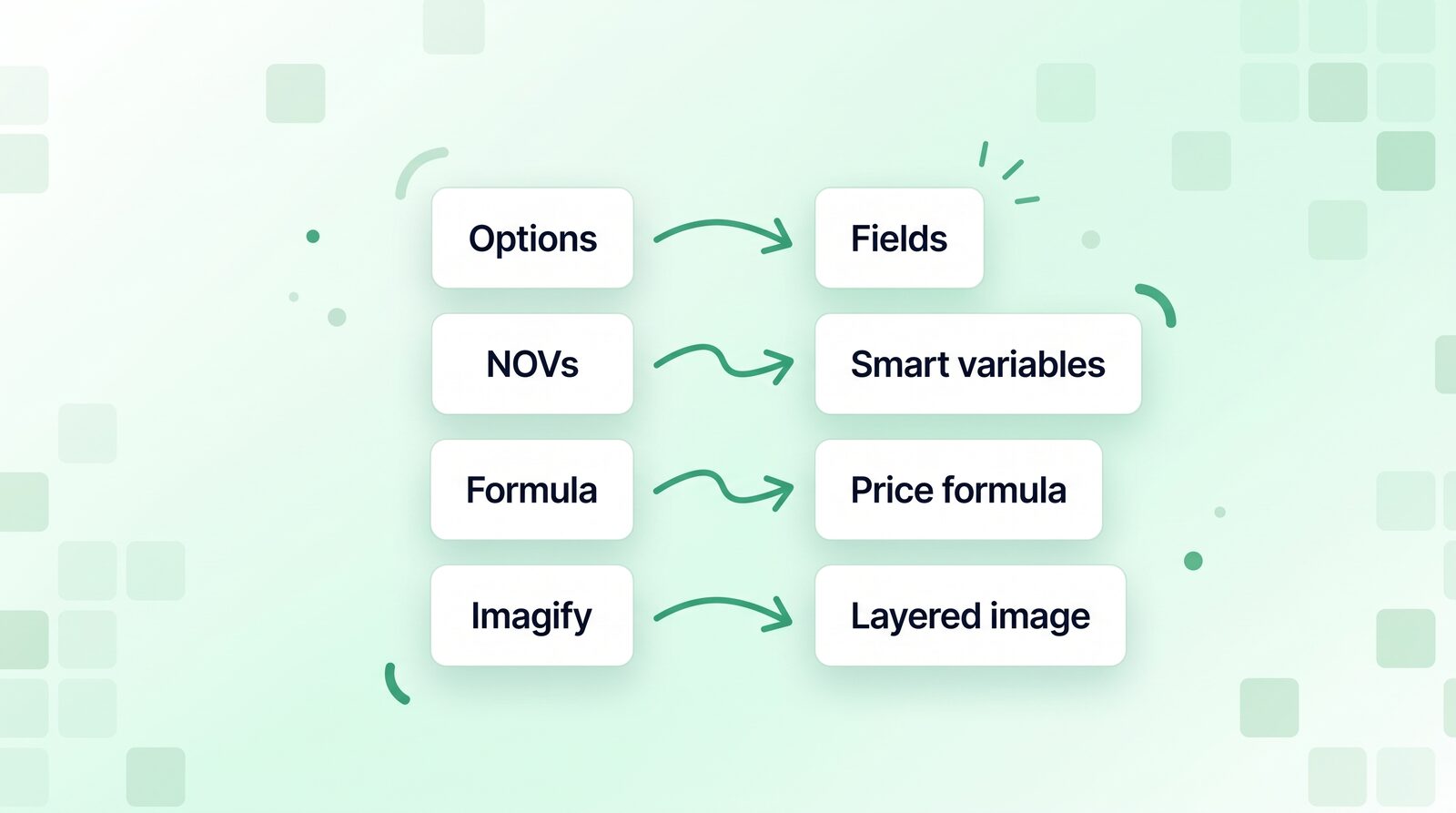
| Non-Option Variables (NOVs) | Smart variables | One smart variable per NOV |
| Main price formula | Price formula | Flat and rule-based (formula scheme) |
| Weight formula, shipping-class rules | Weight formula, shipping-class formula | Rule-based too |
| Field conditions | Field conditions | AND/OR and nested groups |
| Imagify and colorify | Layered Image preview | One layer per field, using the result images |
| Text, image and button modules, rows and columns | Paragraph, image, buttons, groups | Rows become stacked groups |
Every migrated form also gets a quantity field and an Add to Cart button at the bottom, so the product can be bought straight away.
How do Uni CPO formulas translate?
The migration rewrites the variables for you. Uni CPO’s product price, {uni_cpo_price}, becomes wc_price, the WooCommerce price CraftForms adds to every product form. A NOV such as {uni_nov_cpo_area} becomes a smart variable called area.
Uni CPO:     {uni_nov_cpo_area}*{uni_cpo_price}
CraftForms:  area*wc_price
Two details are handled for you that would trip you up by hand:
- Option rates. In a Uni CPO formula, a choice field stands for the selected option’s rate. In CraftForms a choice field holds the option’s value. So when a formula uses a choice field for maths, the migration adds a small linked variable (for example
paper_rate) that looks up the selected option’s price and puts that in the formula instead. - Powers. Uni CPO uses
^for “to the power of”. In CraftForms^means something else, and the power operator is**. The migration swaps them, so(qty*set)^0.96becomes(qty*set)**0.96. If you write formulas yourself afterwards, the formula editor warns you when it sees a^.
Rule-based pricing (Uni CPO’s formula scheme, where a different formula applies when a condition matches) becomes a conditional smart variable: one “when … then …” row per rule, plus a default. The price formula then points at that variable.
What doesn’t convert?
Some Uni CPO features have no CraftForms equivalent yet, or work too differently to convert safely. The migration skips them and says so in the Notes column for each product:
- Matrix fields. They’re skipped, and a placeholder is left in the form so you know where one was. Rebuild them as a Table smart variable: type in your price grid or use Import CSV, then pick the row and column variables (width and height, say) the price is looked up by.
- Google Map, distance by postcode, font preview and extra cart buttons. No equivalent; skipped.
- Length, width and height formulas. CraftForms has no dimension formula yet. The note includes the converted formula, so you can copy it if you need it later.
- “Disable” price branches. In Uni CPO a rule can mark a combination as not for sale. CraftForms has no “can’t be bought” price, so those branches come out as 0. Hide the combination with conditional logic or stop it with stock instead.
{uni_cpo_total}. CraftForms has no built-intotalvariable. If a formula uses it, the note tells you to add atotalsmart variable.- Dynamic notices with
{# if #}logic. The template logic doesn’t translate. A placeholder marks where it was; rebuild the message as an info block. - Images hosted somewhere else. If a swatch or layer image comes from another domain (often a leftover demo site), the note flags it. Upload it to your Media Library and swap it in.
Field conditions that use number ranges or nested AND/OR groups are migrated as working logic. The Field Conditions window can’t display them yet, though, and saving that window again replaces them. The note tells you which fields this applies to.
How do you migrate from Uni CPO, step by step?
Before you start, back up your site. The migration doesn’t change or delete anything in Uni CPO, but it does create forms and products, and a backup is the right habit before any bulk change.
You need:
- WooCommerce and Uni CPO active. The migration reads Uni CPO’s data, and the tab only appears while it’s running.
- CraftForms Pro, active and licensed.
Step 1: Open the migration tab
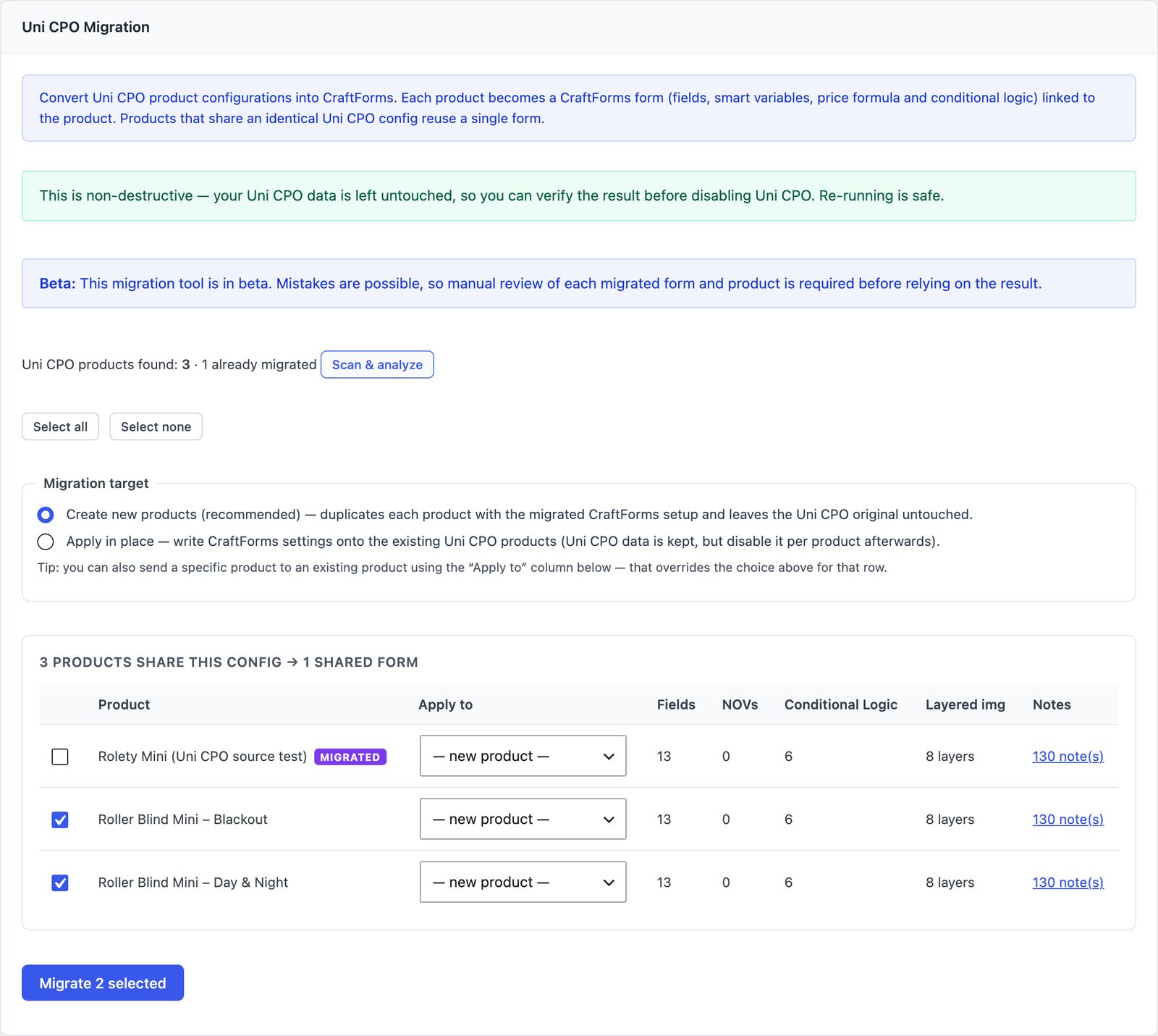
Go to CraftForms → Settings and open the Uni CPO Migration tab. It shows how many Uni CPO products it found, and how many are already migrated.
Step 2: Scan and analyse
Click Scan & analyze. This is a dry run that writes nothing. For each product it works out the form it would build and how many fields, options, NOVs, conditions and image layers it would carry over. It also lists anything it would skip.
Products with the same fields are grouped under a heading such as “3 products share this config → 1 shared form”. Two products count as the same when they have the same fields in the same order with the same conditions. Prices, NOVs and formulas don’t need to match, because those stay on each product. When the shared products offer slightly different options for the same field, the shared form gets all of them.
Step 3: Choose where the result goes
Under Migration target pick one:
- Create new products (recommended). Each product is copied to a new draft product with the CraftForms setup. The SKU is cleared on the copy, so it doesn’t clash with the original. The Uni CPO original keeps selling while you check the copy.
- Apply in place. The CraftForms setup is written onto the existing product. The Uni CPO data stays, but you’ll need to switch Uni CPO off for that product afterwards.
You can also send a single product somewhere specific with the Apply to dropdown on its row, for example onto a product you’ve already rebuilt.
Step 4: Migrate
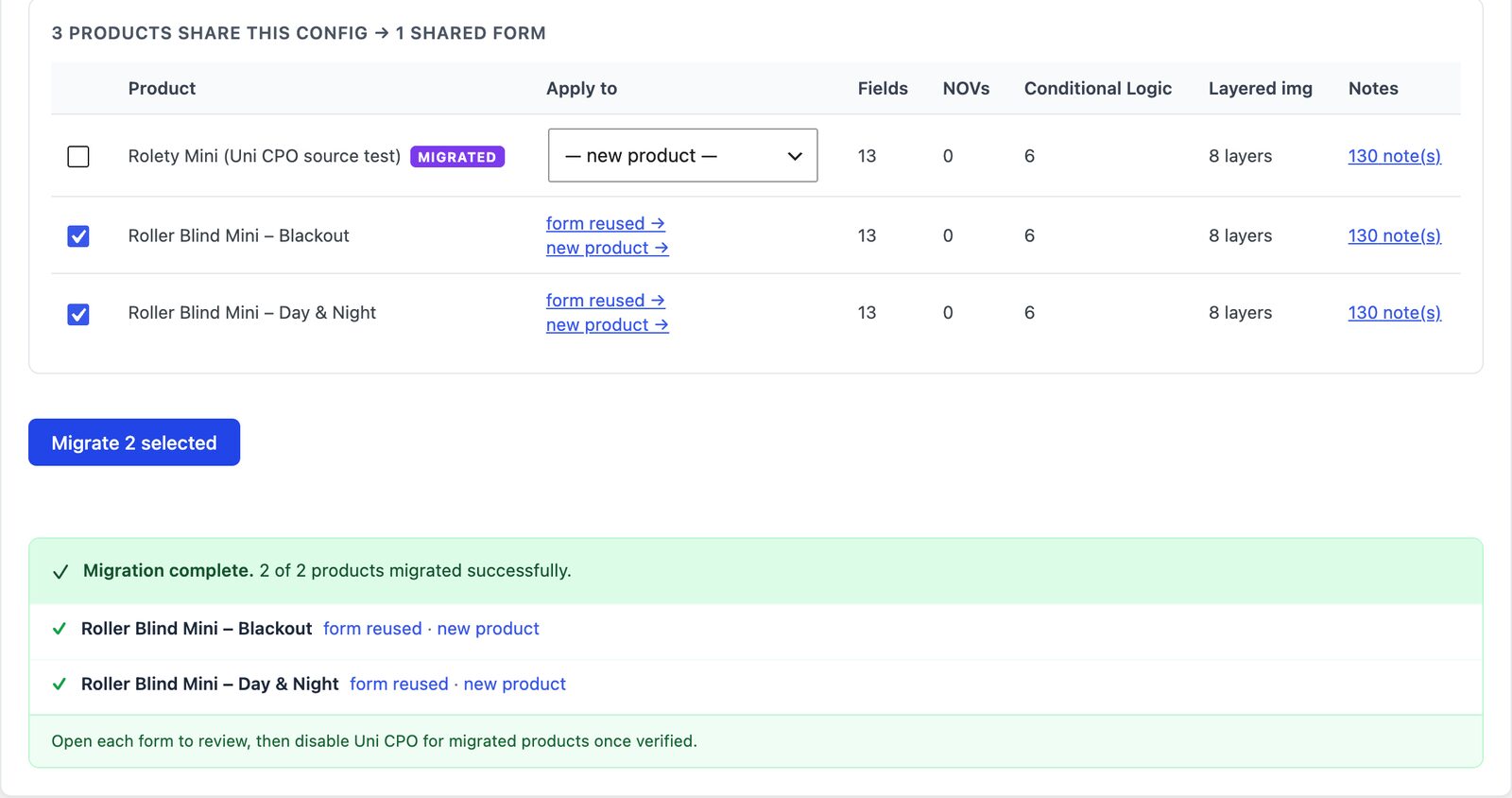
Tick the products you want (or Select all) and click Migrate. A banner confirms how many products migrated, and each row links to form created or form reused, and to the new product if you chose new products.
Running it again is safe. A product that was already migrated is marked as such, and a product whose fields match an existing migrated form reuses that form.
Step 5: Check each product
The migration tool is in beta, and the tab says so. Treat each result as a strong first draft:
- Open the new product and preview it. Try a few option combinations and compare the price with the Uni CPO original.
- Read the Notes for that product and fix what they mention.
- Check the image layers if the product used imagify.
- When it matches, publish the new product and take the old one down. If you migrated in place, switch Uni CPO off for that product.
Where does the pricing end up? For a product with its own form, the price formula and smart variables go on the form. For products that share a form, they go on each product (in the product’s CraftForms panel), so one form can serve products with different prices. That’s the same pattern as one form for many products.
What do you get after moving?
The same kind of configurator, plus things Uni CPO couldn’t do:
- The block editor. Forms are built in the same Gutenberg editor as your pages, with live preview while you edit.
- Price tables. A Table smart variable holds a width × height price grid, so you don’t stack conditions for every combination. See complex pricing without hundreds of variations.
- 50+ formula functions, including
round,ceil,min,max,powandsqrt. - Stock by option. Track inventory per option without variations: stock by option.
- Image changes by option, either as layers or a whole-image swap: change the product image by option.
- Editing from the cart. Customers can open a configured item from the cart and change it.
- The same form outside WooCommerce. A form can also run as a quote request or a booking, on its own page.
If you’re still comparing options rather than moving, our WooCommerce product configurator roundup puts CraftForms next to the others.
FAQ
Will the migration change or delete my Uni CPO products?
No. It reads Uni CPO’s data and never writes to it. With Create new products it doesn’t change the original product at all, apart from a note that it was migrated.
Can I migrate only some products?
Yes. Tick the ones you want. You can migrate a few, check them, and come back for the rest. Products already migrated are marked in the list.
Do I need Uni CPO Pro?
The migration reads what Uni CPO stores for each product, and it needs Uni CPO active while it runs. Once your products are checked and live on CraftForms, you can deactivate Uni CPO.
Does it bring over past orders?
Orders aren’t touched. Past orders keep the option data Uni CPO saved on them. New orders for migrated products store CraftForms’ option data instead.
What if a migrated price doesn’t match?
Open the product’s Notes first: most mismatches are a skipped piece (a matrix, a {uni_cpo_total}, a “disable” branch). Then open the price formula and test it with the same choices. If it still looks wrong, post the formula in the CraftForms Facebook group and I’ll look at it.
Bring your products home
Your configurators took years to tune. Moving them shouldn’t mean starting again. Scan the store, migrate a handful of products as drafts, compare them with the originals, then do the rest.
You can download the free edition to try the form builder first; the migration itself is part of CraftForms Pro.