
The Best WordPress Calculator Form Plugins in 2026 (Compared Honestly)
- Category
- Article
- Published
- Updated
- Reading time
- 13 min
- Tags
The best WordPress calculator form plugin depends on the hard part of your calculator. If it’s arithmetic on a few fields, almost any paid form plugin will do it, and Calculated Fields Form does it for free. If prices come from a grid (width × height, quantity tiers), you need lookup tables, which only a few of these have. If the visitor should pay the total on the spot, check which tier unlocks payments, because it’s often not the tier that unlocks calculations.
We compared seven plugins on exactly those points: how you write a formula, whether there’s a lookup table, whether it can draw a live chart, how payments work, and the price of the cheapest tier that calculates. Prices were checked on each vendor’s own pricing page on 19 October 2026.
A disclosure before we start: we build CraftForms, one of the seven. It’s listed first because it’s ours, not because it wins every row. Where another plugin is the better pick, we say so.
In short:
- Free and capable: Calculated Fields Form. JavaScript-style formulas in the free version; charts, data-source lookups and WooCommerce from its Developer edition (one-time payment).
- Prices from a grid (size × material, quantity tiers): CraftForms has a built-in 2D price table with "closest up" lookup and CSV import. Formidable has a Lookup field. The others need add-ons or nested formulas.
- Deepest maths functions: Fluent Forms Pro and WS Form PRO (trigonometry, logs, powers).
- You already own Gravity Forms: its calculations are in every licence, but Stripe, PayPal, Square and Mollie start at the Pro licence ($159/year).
- A standalone cost calculator, not a form plugin: Cost Calculator Builder.
- Live chart of the result: CraftForms (pie and donut) and Calculated Fields Form (Chart.js, Developer edition).
- WPForms has calculations too, but only from its Pro plan ($199.50 intro, $399/year after).
What should a WordPress calculator plugin do?
Every plugin here can add two fields together. The differences show up in five places:
- The formula language. Some use JavaScript expressions, some use merge tags with basic arithmetic, some have their own function library. This decides whether "round up to the next pack of 10" or a mortgage payment is one line or a workaround.
- Lookup tables. Real price lists are grids. A banner printer charges by width band and height band. A tutor charges by level and hours. Writing that as nested
ifstatements works until someone changes a price. - A live result people can see. A running total, ideally formatted as money, and sometimes a chart.
- What happens after the maths. Can the visitor pay the calculated total? Get a PDF quote? Does the result land in your inbox with the inputs attached?
- Server-side checking. If the price is only calculated in the browser, a visitor with dev tools can change it before paying. For anything that takes money, the total should be recalculated on the server.
And one quiet trap: the tier. Several plugins advertise calculators on the home page but only include them two plans up.
The 7 best calculator form plugins for WordPress, compared
| Plugin | Calculations in free version | Formula style | Lookup / price table | Live chart | Cheapest tier that calculates |
|---|---|---|---|---|---|
| CraftForms | No (paid plans) | Expressions, 30+ functions | ✅ 2D table, closest-up, CSV | ✅ Pie / donut | €50.99/yr (5 sites) or €129.99 once |
| Calculated Fields Form | ✅ | JavaScript expressions | ✅ Data sources (Developer) | ✅ Chart.js (Developer) | Free; Developer €59.99 once |
| Gravity Forms | No free version | Merge tags + arithmetic | Via third-party add-ons | ❌ | $59/yr (1 site) |
| Formidable Forms | No (paid plans) | [id] + JavaScript Math |
✅ Lookup field | Entry graphs (Plus+) | $39.50/yr intro, $79 after |
| WS Form | No (PRO) | #calc() + 20+ math functions |
Not built in | ❌ | $59/yr (1 site) |
| Fluent Forms | No (Pro) | Own syntax, wide function set | Not built in | ❌ | $79/yr ($63 on sale) or $349 lifetime |
| Cost Calculator Builder | ✅ (basic formulas) | Formula element | Not built in | ❌ | Free; Pro from $59/yr |

1. CraftForms
CraftForms is a form builder that runs inside the Gutenberg block editor, so a calculator is built from blocks like any other page. The maths lives in Smart Variables: named values you define once and reuse in the price formula, in labels, in emails and in PDFs.
What it calculates
- Expression variables with 30+ built-in functions, including
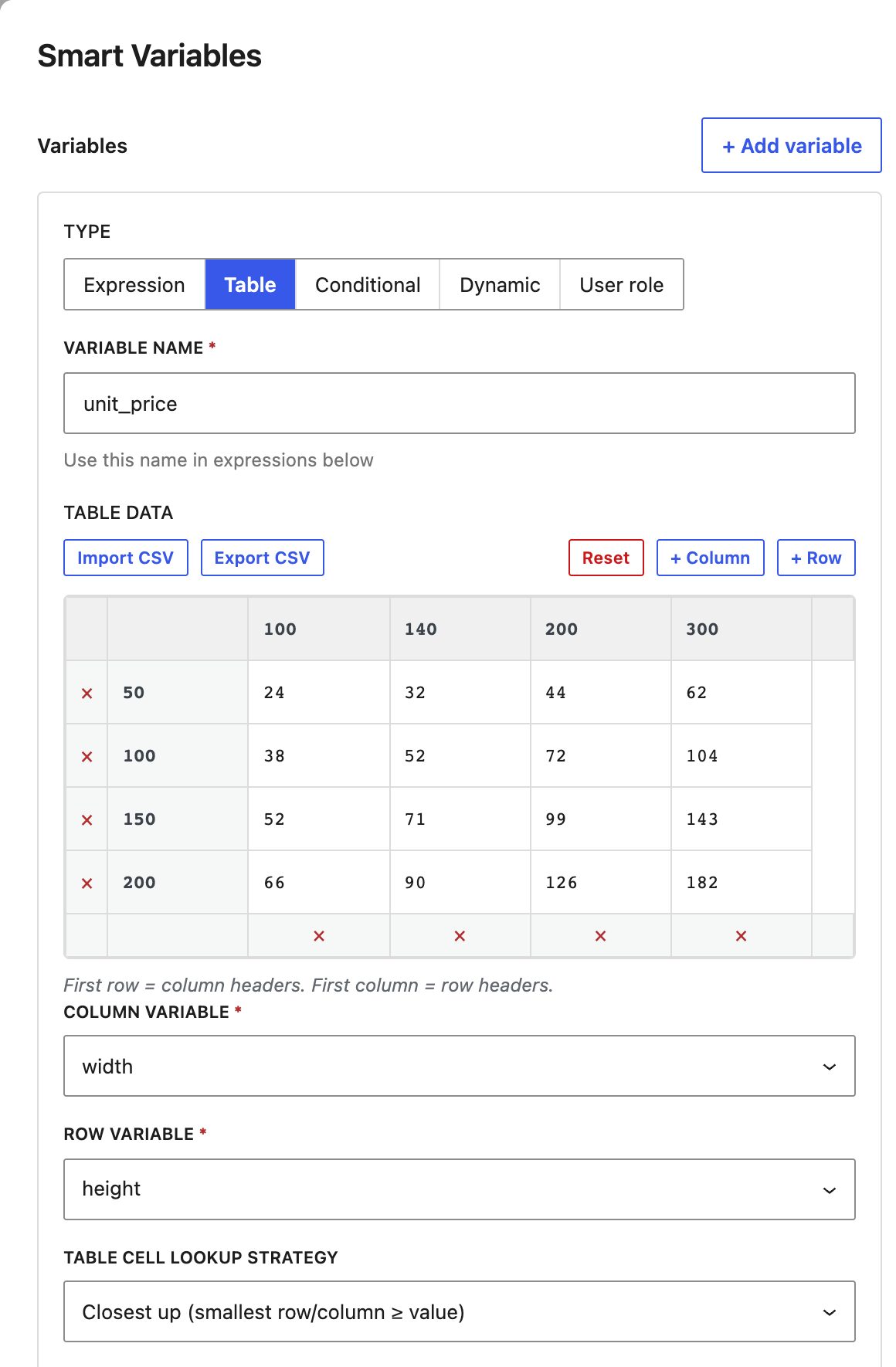
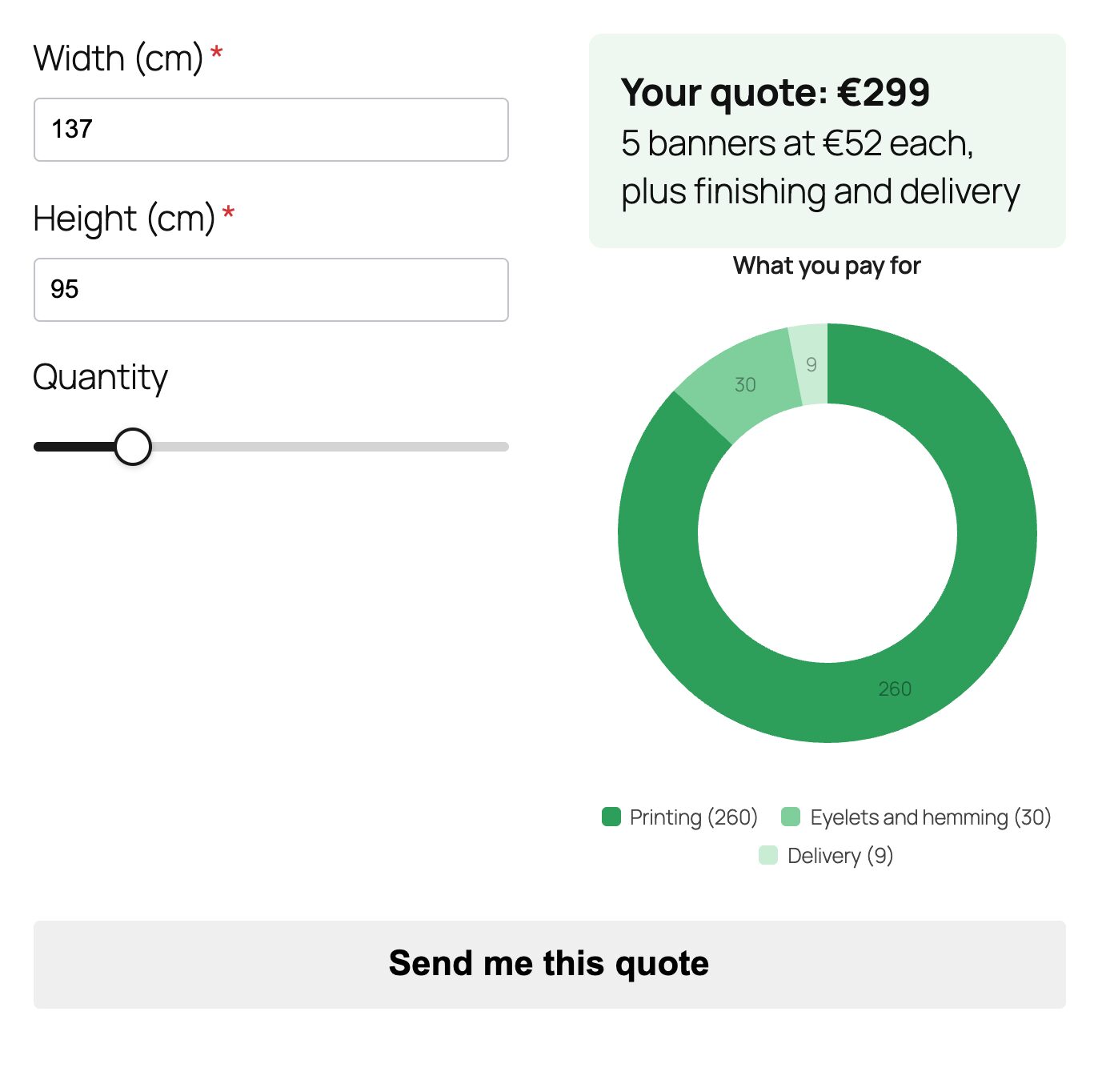
round,ceil,floor,min,max,sum,sqrt,pow()and date helpers such ascount_nights(). Powers usepow(a, b)ora ** b. One gotcha if you’re coming from Fluent Forms or Excel: in CraftForms^is bitwise XOR, not power. - Table variables: a 2D price grid where the row and column come from fields. The lookup can be Exact match, Closest up (the smallest row or column that’s at least the value) or Closest, so a 137 cm banner is priced from the 140 cm column. Grids import and export as CSV.
- Conditional variables and option prices that feed straight into the formula, for "if this option, then that price" without nested
ifs. - A live total in an InfoBlock, a Chart block that redraws a pie or donut as visitors type, Value Presets buttons that fill several fields at once ("Starter / Pro / Team"), and a Range Slider Field.
- The price is recalculated on the server at submit, so the amount charged never comes from the browser.
After the maths: Stripe, PayPal, Mollie and Square through your own accounts, PDF quotes or invoices (the PDF designer is free), branded emails, and WooCommerce product pages if you sell there.
Tier and price: calculations, conditional logic, charts and payments are in the paid plans. Indie is €50.99 a year for 5 sites; Startup is €129.99 once for unlimited sites. Both have the same features. The free Community edition has no submission limits and no branding, but it doesn’t calculate.
Honest weakness: the free version is a form builder, not a calculator. There are no multi-step forms yet, the chart draws pie and donut only (no line or bar charts over time), and there are far fewer third-party add-ons than for Gravity Forms. The free edition downloads from our own site, not the WordPress plugin directory.
Best for: price lists that are really tables, quotes that should become a payment or a PDF, and calculators that need to explain a total with a chart.
If you want to see one built end to end, our roller blinds configurator tutorial walks through a width × height price matrix.
2. Calculated Fields Form
Calculated Fields Form (CFF) is the specialist. It’s on the WordPress plugin directory with 40,000+ active installs, and its free version is the most capable free calculator here.
What it calculates: as many calculated fields as you like, written as "any valid JavaScript expression or function", with a formula editor that highlights syntax and flags errors. Operation libraries cover maths, dates, conditions and more. Dependencies show, hide, enable or disable fields based on input, in the free version.
Paid editions are one-time purchases. Professional adds PayPal and Stripe, with the charge set by a calculated field. Developer adds data-source controls (databases, CSV files, posts, users, JSON), financial and distance modules, a Chart.js module and a WooCommerce add-on. Platinum adds a PDF generator, signatures and file uploads. On 19 October the vendor’s download page listed Professional at €29.99, Developer at €59.99 and Platinum at €89.99, next to higher figures of €49.99, €99.99 and €149.99.
Honest weakness: it feels like a developer tool. Comfort with JavaScript expressions helps a lot, and the editor is a world away from the block editor. Lookups and charts, two of the reasons to pick it, sit in the Developer edition.
Best for: finance, health and engineering calculators where the maths is the product, on a budget, by someone happy to write expressions.
3. Gravity Forms
Gravity Forms is the long-standing developer favourite, and calculations are part of the core plugin. You tick Enable Calculation on a Number field (or use the Calculation price type on a Product field) and build the formula from merge tags and operators.
What it calculates: arithmetic across text, number, dropdown, checkbox, radio, hidden and product fields. It’s deliberately simple. Fields used in a formula must come before the calculation field, and the Total field can’t be used inside one. For conditional formulas and extra functions, people add third-party plugins such as Gravity Wiz’s Advanced Calculations. Lookup tables also come from the add-on market rather than core.
Tier and price: Basic is $59 a year for one site and includes calculations. But the Stripe, PayPal Checkout, Square and Mollie add-ons start at Pro, $159 a year for three sites. Elite is $259 for unlimited sites and includes every official add-on. There’s no free version and no lifetime licence.
Honest weakness: a priced calculator that takes payment costs $159 a year minimum, and anything beyond plain arithmetic means another add-on.
Best for: teams already on Gravity Forms, who want its huge add-on market and years of developer docs. Our CraftForms vs Gravity Forms comparison goes feature by feature.
4. Formidable Forms
Formidable pitches itself hard at calculators.
What it calculates: formulas reference fields by ID or key ([25]*[26]), with standard operators, modulo, the ternary operator and JavaScript’s Math object (Math.pow(), Math.max(), Math.ceil()). Its docs also describe calculations that run during validation and are stored server-side only. A Lookup field can pull values from another form’s entries, which can work as a price table. Conditional logic is on every paid plan.
Tier and price: "Calculations" appear from Basic, $39.50 the first year and $79 after, for one site. Basic and Plus include Stripe, PayPal and Square but with a 3% transaction fee; the fee goes away on Business ($199.50 intro, $399 after). Graphs and Views start on Plus, and the full "Calculator Forms" row in their comparison table only ticks for Business and Elite.
Honest weakness: the cheap entry price comes with a transaction fee on payments and a confusing split between "Calculations" and "Calculator Forms" across plans. Its graphs are mainly for charting submitted entries, not one visitor’s live inputs.
Best for: data-heavy sites that also want to display entries (directories, results tables) with Views. See CraftForms vs Formidable Forms.
5. WS Form
What it calculates: wrap any expression in #calc() and it updates in real time. Reference fields with #field(ID), count repeater rows with #section_row_count(), and format money with #ecommerce_price(). The function list is long: abs, avg, ceil, floor, round, pow, sqrt, min, max, logs and the trig functions. Conditional logic is very deep.
Tier and price: calculated fields are in PRO Personal, $59 a year for one site. Payments are the catch. On the pricing page, PayPal is included from Freelance ($149 a year, 5 sites), and Stripe and the PDF add-on are only in the Agency bundle ($249 a year, unlimited sites); below that they’re sold separately.
Honest weakness: no built-in 2D price grid that we found, and a calculator that takes Stripe payments costs $249 a year or an extra add-on.
Best for: developers who want the strongest logic engine and are fine wiring everything themselves. See CraftForms vs WS Form.
6. Fluent Forms
Fluent Forms has the most generous free tier of the general form builders: conditional logic is free, and so is Stripe (with a 1.9% fee that Pro removes). Calculations are not.
What it calculates: Numeric Calculation is a Pro feature. Its formula language is the richest of the "pick fields and operators" type: + - * /, Mod, ^ for power, factorial, and functions like round, ceil, floor, min, max, pow, root, log, ln and the trig family.
Tier and price: Pro Single Site is $79 a year ($63 on sale when we checked) or $349 lifetime. Pro adds PayPal, Square, Mollie, Razorpay, Paddle, Paystack and Authorize.net.
Honest weakness: no lookup tables, so grid pricing turns into long formulas. And the lifetime licence covers one site.
Best for: a budget all-rounder that needs a decent calculator alongside lots of other forms. More in CraftForms vs Fluent Forms.
7. Cost Calculator Builder
Cost Calculator Builder (by Stylemix) isn’t a general form plugin. It builds calculators: you drop elements into a calculator and a Total element sums them with a formula. The free version (20,000+ active installs on the plugin directory) includes the formula element, currency options and calculator import and export.
Pro adds the things a quote calculator usually needs: conditional logic ("Conditional System"), Stripe, PayPal, Razorpay and cash payments, WooCommerce checkout, PDF invoices, an orders dashboard, a "share quote" email and step-by-step calculators.
Tier and price: Pro for one site was listed at $59 a year or $149 lifetime on 19 October, alongside higher figures of $89 and $229. Ten sites: $119 a year or $299 lifetime.
Honest weakness: conditional logic isn’t in the free version, which rules out most real quote calculators without paying. And it doesn’t double as your contact, booking or order form plugin.
Best for: a single, polished cost estimator (cleaning, moving, renovation) on a site that already has its forms sorted.
Also considered: WPForms
WPForms has a solid Calculations add-on with if / elseif / else blocks, comparison and logical operators. It requires the Pro plan: $199.50 the first year, $399 after, for five sites. That’s the most expensive way into calculations on this list, so it didn’t make the seven. If you already pay for WPForms Pro, use it. See CraftForms vs WPForms.
Which calculator plugin should you choose?
Start from the hard part of your calculator:
- "I need it free." Calculated Fields Form. Cost Calculator Builder if it’s a single estimate with no conditions.
- "Prices come from a table." CraftForms (2D table with closest-up and CSV) or Formidable (Lookup field). CFF Developer can read a CSV data source.
- "The maths is scientific or financial." WS Form PRO or Fluent Forms Pro for the function lists; CFF for raw JavaScript.
- "The visitor pays the total." Check the payment tier, not the calculator tier: Gravity Pro $159, WS Form Agency $249, Formidable Business to drop the 3% fee. CraftForms, Fluent Pro and CCB Pro include their gateways in the tier that calculates.
- "It should show a chart." CraftForms for live pie and donut charts, CFF Developer for Chart.js line and bar charts. Our guide on how to build a calculator with a live chart in WordPress shows mortgage, savings and solar examples.
- "It’s on a WooCommerce product." That’s a different shortlist. See our WooCommerce product configurator roundup.
Do calculator plugins check the price on the server?
They should, if the calculator takes money. A total calculated only in the browser can be edited by anyone who opens developer tools.
CraftForms recalculates the price on the server at submit. Formidable documents server-side calculations that run during validation. For the others, look in their payment docs for how the charged amount is set before you trust a calculated field with a card payment.
FAQ
What is the best free calculator plugin for WordPress?
Calculated Fields Form. Its free version supports unlimited calculated fields with JavaScript expressions and conditional dependencies. Cost Calculator Builder’s free version also calculates, but without conditional logic.
Does Gravity Forms do calculations without an add-on?
Yes. Number fields and Product fields can calculate in every Gravity Forms licence. Taking a payment for the result needs the Stripe, PayPal, Square or Mollie add-on, which starts at the Pro licence.
Can I build a price calculator with a lookup table in WordPress?
Yes. CraftForms has a Table variable (a 2D grid with Exact, Closest up and Closest matching, CSV import). Formidable has a Lookup field, and Calculated Fields Form’s Developer edition can read CSV and database data sources.
Which WordPress form plugins can show a chart of the result?
CraftForms draws live pie and donut charts from fields and Smart Variables. Calculated Fields Form’s Developer edition includes a Chart.js module. Formidable’s graphs are mainly for submitted entries.
Is CraftForms free?
The Community edition is free, with no submission limits and no branding, and it includes the PDF and email designers. Calculations, conditional logic, charts and payments are in the paid plans: Indie at €50.99 a year for 5 sites, or Startup at €129.99 once for unlimited sites.
The short version
Any of these will add up a few fields. Pick on the part that’s hard for you: price tables, payments, charts or price. Then check the tier, because that’s where the real cost hides.
If your price list is a table, or the total should turn into a payment and a PDF, try CraftForms. The free edition lets you build the form first; the paid plans switch on the maths.