
When You Outgrow Hosted Form Endpoints (Formspree, Netlify Forms, Web3Forms, and Friends)
- Category
- Article
- Published
- Updated
- Reading time
- 5 min
- Tags
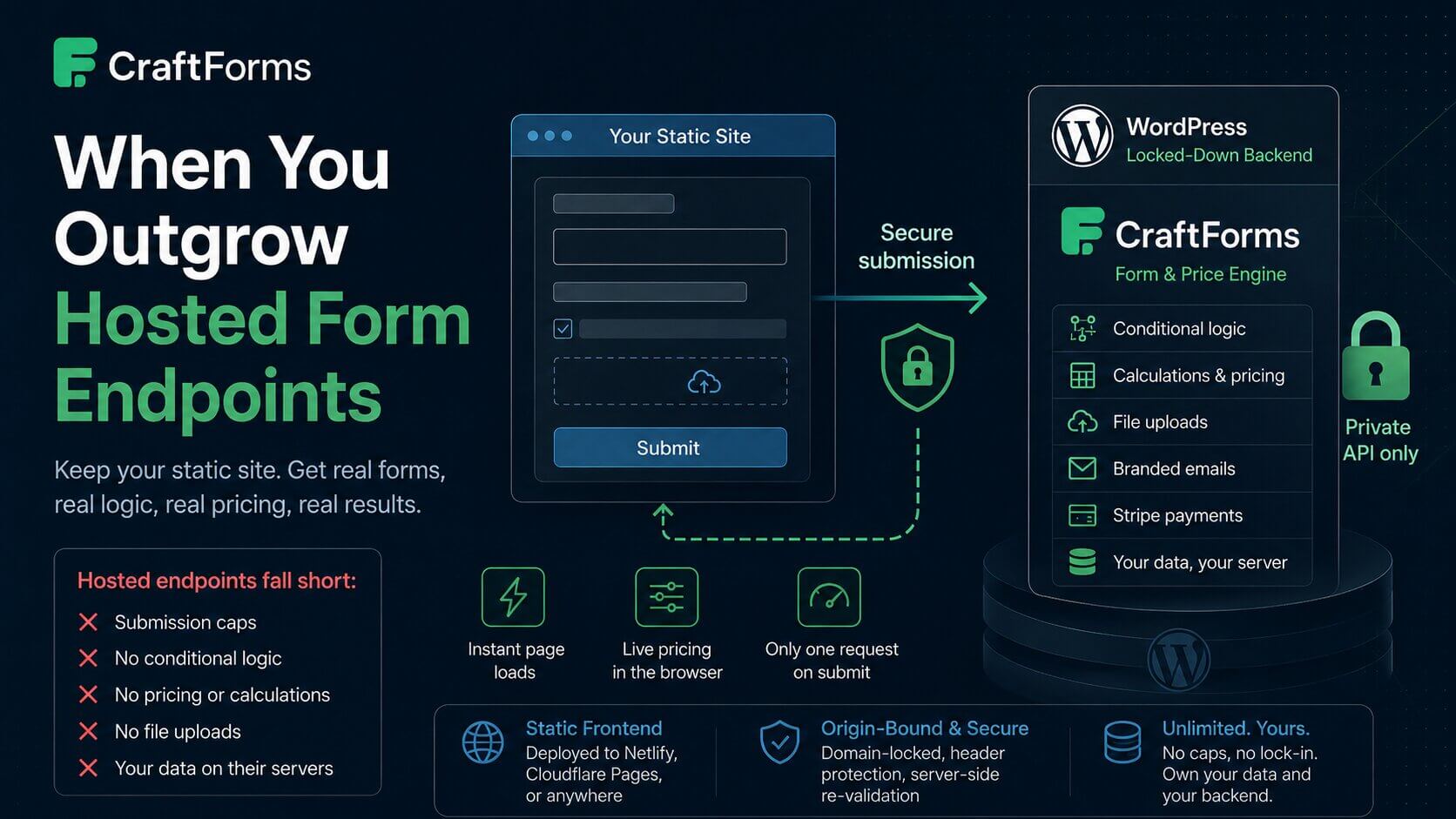
If you build static sites, you’ve used one: a hosted form endpoint. You paste a form action, the service catches the submission and emails it to you, and you move on. Formspree, Netlify Forms, Basin, Getform, Web3Forms, staticforms.dev — they’re all variations on the same convenient idea, and for a single contact form they’re genuinely great.
Then the site grows up. You add a second form, then a fifth. You need a field that only shows when another is checked. You need a file upload. You need a confirmation email that looks like your brand. You hit a monthly submission cap. You realize your submission data — sometimes including personal details — lives on a service you don’t control. Or the ask stops being “collect some fields” entirely: you need a product configurator with a live price, a booking form that checks availability, or a form that actually takes payment. A hosted endpoint was never built for any of that — it can catch a submission, not run a product. At some point “convenient” quietly became “limiting.”
This post is about recognizing that moment, and what to do when you reach it.
What hosted endpoints are great at
Let’s be fair. For the right job they’re excellent:
- Zero backend. Nothing to host, patch, or monitor.
- Minutes to set up. Paste a URL, done.
- Cheap or free at low volume.
If you have one contact form and light traffic, stop reading and use one. Really.
Where they start to hurt
The limits are structural, not bugs — they come from being a generic catch-all:
| Need | Typical hosted endpoint | A CraftForms backend |
|---|---|---|
| Many forms | Each is a separate config / project | Any number, one install |
| Submission volume | Monthly caps (e.g. free tiers around 50–250/mo) | No caps — it’s your database |
| Spam protection | Basic; some tiers have no CAPTCHA at all | Origin-bound + header gate (no CAPTCHA yet either — see below) |
| Conditional logic | None — it’s a dumb receiver | Field-to-field conditions, AND/OR |
| Pricing / calculations | None | Formulas, tiered lookups, price matrices |
| Product configurators | None | Options, live price, file uploads, add-to-cart |
| Bookings | None | Availability, capacity, iCal sync |
| File uploads | Limited or paid-tier only | Built in, server-validated |
| Branded emails | Minimal templating | Visual template builder |
| Payments | Not their job | Stripe (hosted or embedded), PayPal |
| Data ownership | Stored on their infrastructure | Your WordPress database |
None of these matter for a contact form. All of them matter for registrations, bookings, quotes, orders, and configurators — and that last group is the point: the same engine that replaces a hosted endpoint also replaces a separate “product configurator” plugin or a payment page, because it was never just a form tool.
The alternative: a backend you own
You don’t have to choose between “hosted endpoint” and “rewrite everything as a fullstack app.” There’s a middle path that keeps your static frontend exactly as it is: run one locked-down WordPress install as a private form backend, with CraftForms as the engine.
- One backend, unlimited forms, all in one place.
- No submission caps — it’s your database.
- Conditional logic, calculations, file uploads, branded email, Stripe payments — built in.
- Product configurators and bookings, not just forms — live pricing, stock per option, availability calendars, WooCommerce add-to-cart — the same engine, not a bolt-on plugin.
- Your data on your server — nothing sits with a third party.
- A near-zero attack surface — the WordPress install has one plugin, no public pages, no XML-RPC, and a hidden login. It isn’t a website; it’s an API.
Your static site connects one of two ways: a direct fetch on submit, or CraftForms’ embed — a <div> + one script that pulls the live form from the backend and renders it in place. Both hit the same REST endpoint; everything else on WordPress is dark. It’s worth internalizing that “form” here covers a lot of ground: the exact same mechanism runs a two-field contact form, a multi-step booking with a deposit, and a product configurator with live pricing and a checkout.
Building sites for clients? The same backend can serve every one of them, each with its own key: see how to run your own form-submission hub.
Isn’t running WordPress the thing we were trying to avoid?
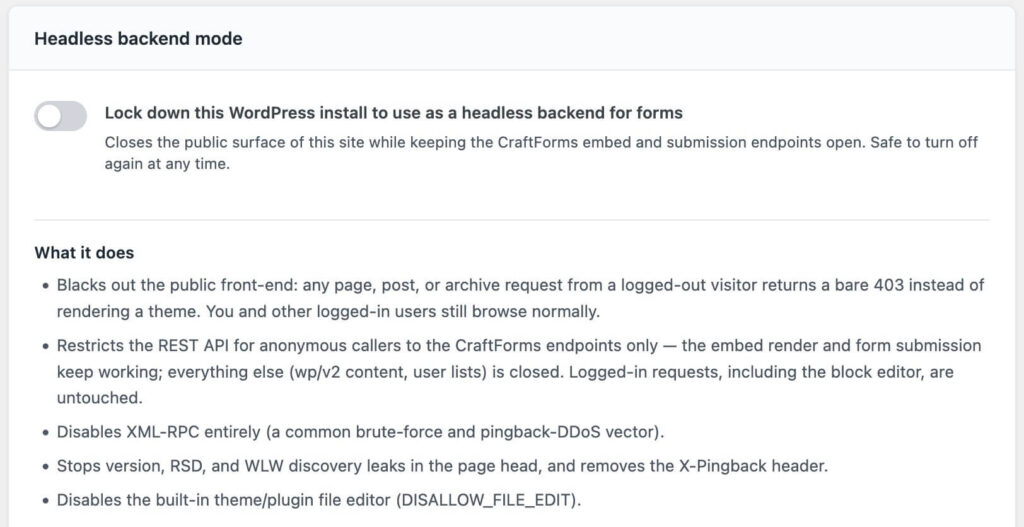
The objection is fair, so be precise about what’s involved. This is not a normal WordPress site you babysit. It has no theme, no public frontend, no page builder, no pile of plugins — the usual sources of WordPress pain and CVEs simply aren’t installed. What remains is a submission API. Locking it down to that is a single toggle — Headless backend mode in CraftForms → Settings → Embed blacks out the public front-end, closes the REST API to everything but the CraftForms endpoints, and disables XML-RPC, all in one click, reversible any time. For the pieces a plugin can’t do from inside WordPress — hiding the login page, server-level rules — the locked-down backend guide has the extra mu-plugin snippet and server config. Set it once.
And be honest about the trade-off in both directions: CraftForms doesn’t yet ship a built-in CAPTCHA or honeypot either. What it gives you today is origin-bound submissions (the form only accepts posts from your domain), server-side re-verification of anything that matters (prices, stock, capacity — a tampered value is rejected), and required request headers as a shared-secret spam gate. For most sites that’s a stronger position than an emailed endpoint with no logic at all; if you need heavy bot mitigation right now, weigh that.
A rule of thumb
- One contact form, low volume, no logic? Use a hosted endpoint. It’s the right tool.
- Many forms, real logic, file uploads, pricing, payments, or data you must own? You’ve outgrown the endpoint. Move the backend in-house — a locked-down WordPress + CraftForms — and keep your static frontend exactly as fast as it is today.
The static site was never the problem. The backend was. Pick one you don’t outgrow.
See it built: Add a Real Form Backend to Your Astro Site and Add Forms to a Hugo Site With a WordPress Backend walk through this exact move for those two stacks. If what you actually need is a configurator rather than a contact form, Complex WooCommerce Pricing Without Hundreds of Variations and Track WooCommerce Stock by Option — No Variations show the same formula/stock engine at work.
CraftForms embedding, external submissions, calculations, and payments are CraftForms PRO features.