Static sites are fast, cheap to host, and nearly impossible to compromise — but they can’t process a contact form. Every static site eventually hits the same wall: you need a backend.
Most developers reach for a third-party service (Formspree, Netlify Forms, Basin) or bolt on a separate server. Both options add a dependency you don’t control, a recurring cost, and submission data stored on someone else’s infrastructure. There is a third option that gives you full ownership, unlimited forms, and a security profile close to zero: a locked-down WordPress installation used exclusively as a form backend.
One WordPress install. Zero public pages. Every form submission from every static site you own — handled, stored, and routed — on infrastructure you control.
This article is an evolution of Using WordPress as a Form Backend for Static Sites and Web Apps. That article introduced the idea — a single WordPress install as a submission endpoint. This one picks up where it left off: the site is locked down and invisible to visitors, improved security setup. CraftForms now supports embedded forms — the backend serves the form HTML directly to any external page, with no markup required on the static site side — and the full ecommerce and booking stack that comes with them. The same backend that took contact form submissions can now handle bookings, inventory on a site that has no server of its own.
Part 1 — The Architecture: One Backend, Many Static Sites
The Stack
Three tools, each doing exactly one job:
- WordPress — the backend. Locked down so aggressively it no longer resembles a normal WP install. No theme, no public content, no extra plugins.
- CraftForms — the form engine. Handles form building, validation, submissions, conditional logic, file uploads, and email notifications.
- Builderius — the optional static site builder. Design your pages visually and export clean HTML/CSS/JS files with no WordPress dependency in production.

Your static sites connect to the WordPress backend over HTTPS. Static site A makes a direct fetch call on form submit. Static sites B and C use CraftForms’ embed feature — the form HTML is served from WordPress and rendered on the page automatically. Both methods hit the same craftforms/v1 REST endpoint; everything else on the WordPress install is locked down.
What the locked-down WP install does NOT have
- No public frontend — all page and post requests return 403
- No theme vulnerabilities — no theme is active
- No page builder, no WooCommerce, no third-party contact form plugin
- No XML-RPC
- No
/wp-login.phpat its default path
A JAMstack site on Cloudflare Pages or Netlify serves your visitors. WordPress never touches a public HTTP request. It only processes form submissions.
Part 2 — Locking Down the WordPress Installation
Why One Plugin Changes Everything
The most common vector for WordPress compromise is not your hosting provider — it’s outdated plugins. Every plugin in your install is a potential attack surface: a page builder you added for one client project, a contact form plugin with a stored XSS CVE published last week, a WooCommerce extension that stopped receiving updates.
A WordPress installation with one plugin and a blocked public frontend has an attack surface close to zero. No theme vulnerabilities, no page builder vulnerabilities, no contact form plugin vulnerabilities — because none of those exist on this install.
The steps below lock down the remaining standard entry points.
Step 1 — Block the WordPress Frontend
The template_redirect action fires before WordPress outputs anything. For any visitor who is not logged in, the hook returns a 403 and exits — no page, no post, no homepage is ever served. Because this runs in PHP it works on any server: Apache, nginx, or a local PHP built-in server. No .htaccess rules or server configuration required.
template_redirect does not fire for REST API requests or wp-admin, so the CraftForms submission endpoint and the admin panel remain fully accessible to logged-in users and external form submissions.
The implementation is in the complete mu-plugin below.
Step 2 — Restrict the REST API to CraftForms Only
All REST namespaces except craftforms/v1 return 403. This closes user enumeration (GET /wp-json/wp/v2/users), route discovery (GET /wp-json/), and every standard WordPress REST exploit in one filter. The filter fires after WordPress resolves the CORS OPTIONS preflight, so cross-origin submissions from your static sites continue to work correctly.
Create wp-content/mu-plugins/craftforms-backend.php — files in mu-plugins/ load automatically on every request, no activation required. The full implementation is in the complete mu-plugin below.
Step 3 — Hide the WordPress Login URL
Automated brute-force scripts target /wp-login.php by default. Moving the login to an unpredictable URL removes your install from every automated scan. Pick a slug that is long, random, and only you know — and store it somewhere safe. Your login page will be at https://your-wp-backend.com/your-secret-slug. Losing the slug means you cannot log in.
The full implementation is in the complete mu-plugin below.
Complete mu-plugin
Create a new PHP file craftforms-backend.php Drop this single file in wp-content/mu-plugins/ and all four measures are active immediately:
<?php
/**
 * CraftForms backend — security measures.
 * Place in: wp-content/mu-plugins/craftforms-backend.php
 */
if ( ! defined( 'ABSPATH' ) ) exit;

// ── 1. Restrict REST API to craftforms/v1 only ──────────────────────────────
add_filter( 'rest_pre_dispatch', function ( $result, $server, $request ) {
    $route = $request->get_route();
    if ( strpos( $route, '/craftforms/' ) === 0 ) {
        return $result;
    }
    return new \WP_Error(
        'rest_restricted',
        'REST API is disabled on this installation.',
        [ 'status' => 403 ]
    );
}, 10, 3 );

// ── 2. Disable XML-RPC ───────────────────────────────────────────────────────
add_filter( 'xmlrpc_enabled', '__return_false' );

// ── 3. Custom login URL ──────────────────────────────────────────────────────
if ( ! defined( 'CF_LOGIN_SLUG' ) ) {
    define( 'CF_LOGIN_SLUG', 'my-secret-access-8k2m9x' ); // ← CHANGE THIS
}

add_action( 'init', function () {
    global $pagenow;
    $request_path = parse_url( $_SERVER['REQUEST_URI'] ?? '', PHP_URL_PATH );

    if ( $request_path === '/' . CF_LOGIN_SLUG ) {
        // wp-login.php reads $user_login and $error before conditionally setting
        // them; initialise here to prevent PHP 8 "Undefined variable" warnings.
        global $error;
        $error      = $error ?? null;
        $user_login = '';
        require_once ABSPATH . 'wp-login.php';
        exit;
    }

    if ( $pagenow === 'wp-login.php' ) {
        status_header( 404 );
        nocache_headers();
        exit( 'Not found.' );
    }
} );

// Rewrite site_url( 'wp-login.php', 'login|login_post' ) calls so the login
// form action POSTs to the custom slug instead of the blocked wp-login.php.
add_filter( 'site_url', function ( $url, $path, $scheme ) {
    if ( 'wp-login.php' === $path && in_array( $scheme, [ 'login', 'login_post' ], true ) ) {
        return home_url( CF_LOGIN_SLUG );
    }
    return $url;
}, 10, 3 );

add_filter( 'login_url', function ( $url, $redirect, $force_reauth ) {
    $custom = home_url( CF_LOGIN_SLUG );
    if ( $redirect ) {
        $custom = add_query_arg( 'redirect_to', urlencode( $redirect ), $custom );
    }
    return $custom;
}, 10, 3 );

add_filter( 'logout_url', function ( $url ) {
    return str_replace( 'wp-login.php', CF_LOGIN_SLUG, $url );
} );

// ── 4. Block all public frontend requests ───────────────────────────────────
add_action( 'template_redirect', function () {
    if ( is_user_logged_in() ) {
        return;
    }
    status_header( 403 );
    nocache_headers();
    exit;
} );
Verify the setup
# Should return 403
curl https://your-wp-backend.com/wp-json/wp/v2/

# Should return form data
curl https://your-wp-backend.com/wp-json/craftforms/v1/embed/YOUR_KEY
Nathan Foley has prepared a GIST – an updated version of this my MU plugin version. The comment was published in our FB group, you can check it here.
Security Measures Summary
| Measure | What it blocks |
|---|---|
| Minimal plugin count | Every plugin not installed = zero CVEs from that plugin |
| PHP frontend block | Web scrapers, bots, and crawlers requesting WordPress pages — works on any server without .htaccess
|
| REST API namespace restriction | User enumeration (/wp/v2/users), route discovery, WordPress REST exploits |
| XML-RPC disabled | Brute-force via XML-RPC, pingback DDoS amplification |
| Hidden login URL | Automated brute-force scripts targeting /wp-login.php
|
Part 3 — CraftForms: External Submissions and Embedding
Enable External Submissions
Open any CraftForms form in the WordPress editor. Scroll to the Advanced Settings panel at the bottom of the settings sidebar — it shows the form’s submission URL and a button to open the full configuration.
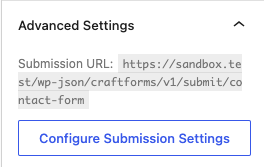
Click Configure Submission Settings. The modal opens with everything you need: the toggle, the endpoint URL, a ready-to-run cURL example, and the field validation table.
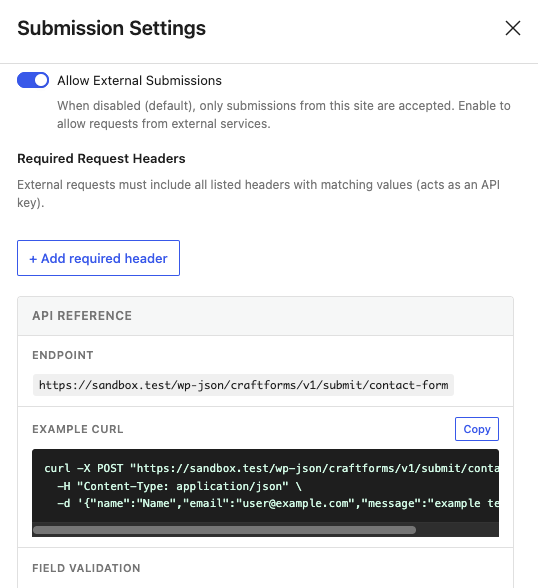
Toggle Allow External Submissions on. The API Reference section below it shows the endpoint — the form’s REST name (a human-readable slug you set when creating the form, e.g. contact-form):
POST https://your-wp-backend.com/wp-json/craftforms/v1/submit/contact-form
Submitting from Your Static Site
CraftForms accepts application/json. For most static site integrations this is the cleanest approach:
cURL:
curl -X POST "https://your-wp-backend.com/wp-json/craftforms/v1/submit/contact-form" \
  -H "Content-Type: application/json" \
  -d '{"name":"John Doe","email":"[email protected]","message":"Hello from curl"}'
Vanilla JavaScript:
<form id="contact-form">
  <input name="name" type="text" placeholder="Name" required />
  <input name="email" type="email" placeholder="Email" required />
  <textarea name="message" placeholder="Message"></textarea>
  <button type="submit">Send</button>
  <p id="status"></p>
</form>

<script>
document.getElementById('contact-form').addEventListener('submit', async (e) => {
  e.preventDefault();
  const status = document.getElementById('status');
  status.textContent = 'Sending…';

  const data = Object.fromEntries(new FormData(e.target));

  const res = await fetch(
    'https://your-wp-backend.com/wp-json/craftforms/v1/submit/contact-form',
    {
      method: 'POST',
      headers: { 'Content-Type': 'application/json' },
      body: JSON.stringify(data),
    }
  );

  const json = await res.json();
  if (json.success) {
    status.textContent = json.data.successMsg || 'Sent!';
    e.target.reset();
  } else {
    status.textContent = json.data.errorMsg || 'Something went wrong.';
  }
});
</script>
Field names must match the Name attribute of each CraftForms field block. The Field Validation table in the Submission Settings modal shows the exact field names and their validation rules:

Required Request Headers
For an extra layer of spam protection, require a shared secret on every submission. Open the Submission Settings modal and click + Add required header in the Required Request Headers section. Any request that omits the header — or sends the wrong value — is rejected before the form is processed.
The header name is entirely up to you — X-CF-Token is just one example. Pick any name and any value:
| Header name | Header value |
|---|---|
X-CF-Token |
your-secret-value |
Add the header to every fetch call from your static site:
const res = await fetch(
  'https://your-wp-backend.com/wp-json/craftforms/v1/submit/contact-form',
  {
    method: 'POST',
    headers: {
      'Content-Type': 'application/json',
      'X-CF-Token': 'your-secret-value',
    },
    body: JSON.stringify(data),
  }
);
Note: This header is visible in the browser’s DevTools Network panel, so it is not a true secret for public-facing forms. It raises the bar for automated spam — scripts that don’t know the header will be rejected — but it is not a substitute for rate limiting. For server-to-server calls (a serverless function proxying the submission) it acts as a proper shared secret.
Embedding a Form
With embedding you don’t build a form on the external site at all. CraftForms renders the form HTML and delivers it — along with all required styles and scripts — directly to the external page. The form submits back to the same WordPress backend automatically.
Setup:
- Make sure Allow External Submissions is enabled on the form (step above).
- Go to CraftForms → Settings → Embed tab. Click Generate new key, select the form, and enter the external domain (e.g.
mysite.com— no protocol, no trailing slash).
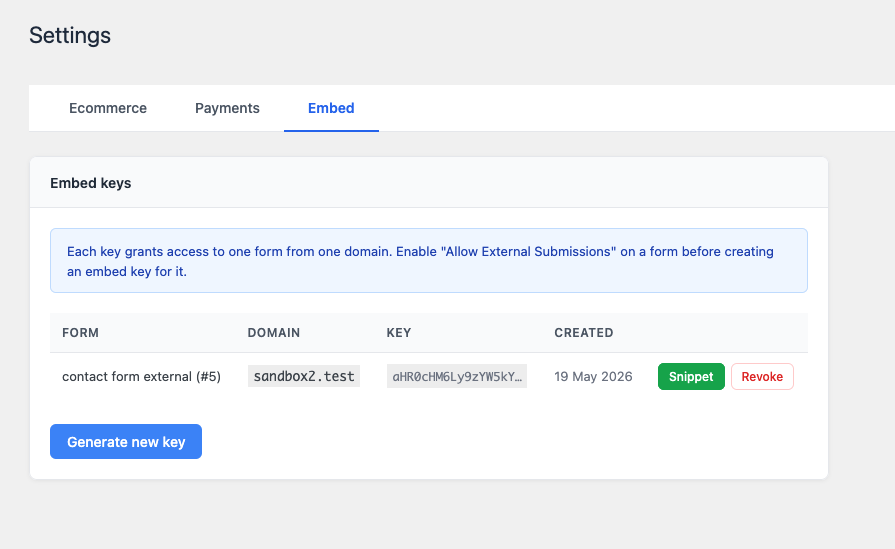
- Click the Snippet button on the new row.
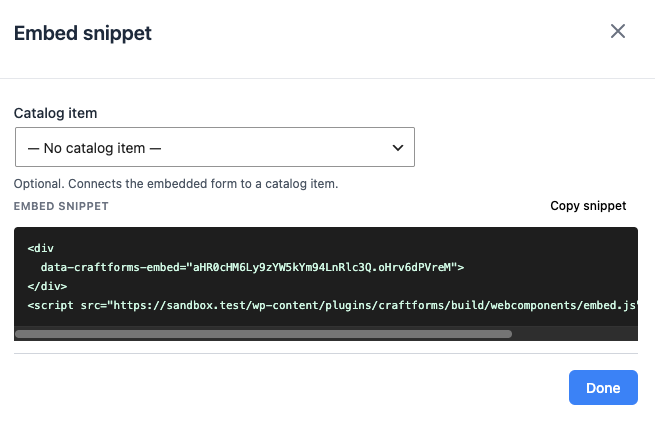
Copy the snippet and paste it anywhere in your HTML page:
<div
  data-craftforms-embed="aHR0cHM6Ly9zYW5kYm94LnRlc3Q.oHrv6dPVreM">
</div>
<script
  src="https://your-wp-backend.com/wp-content/plugins/craftforms/build/webcomponents/embed.js"
  defer>
</script>
The <div> is replaced by the live form at page load — no configuration on the static site side, no build step, no manual form markup.
What you get for free with an embedded form:
- Every CraftForms field type — text, email, file uploads, dropdowns, date pickers, conditional fields, multi-step flows.
- Advanced components — star ratings, range sliders, repeater groups, catalog selectors.
- Client-side validation built in — required fields, email format, character limits, custom error messages. Everything works out of the box; you write zero validation JavaScript.
- Consistent UI — the form looks and behaves identically everywhere it is embedded, because it is the same rendered output from the same source.
Compare that to building the form manually: custom markup, a validation library, wiring up field names, handling error states, writing the fetch call, testing cross-browser. With embedding, that work is already done.
All form submissions use the ?rest_route= URL format — fully compatible with the locked-down setup in Part 2, even if /wp-json/ is blocked at the server level.
With a catalog resource (booking, product, etc.):
<div
  data-craftforms-embed="aHR0cHM6Ly9zYW5kYm94LnRlc3Q.oHrv6dPVreM"
  data-resource-id="42">
</div>
<script src="…/embed.js" defer></script>
What Your Static Site Gains
Third-party form services (Formspree, Netlify Forms, Basin) give you one thing: an email on form submit. CraftForms gives you a backend.
Email that doesn’t land in spam
CraftForms routes email through a real SMTP provider — not PHP’s wp_mail. Under SMTP Servers in the admin menu, add as many providers as you need — Postmark, SendGrid, Mailgun, your own mail server — each with its own credentials. Then, inside each form’s submit actions, the Send Email and Send Email Template actions each have an SMTP server selector: pick which provider handles that delivery. A contact form can send notifications via Postmark; a booking form can use a separate provider tied to your reservations mailbox. No shared infrastructure, no sender reputation you don’t control.
Branded HTML email templates — designed in WordPress
The email template designer is a Gutenberg editor. Add headings, images, buttons, and text blocks; insert {{field_name}} variables anywhere. CraftForms compiles the design to optimised, email-client-compatible HTML automatically. The confirmation email a customer gets after booking a stay looks like it came from a real hospitality brand — because you designed it, in the same editor you use for everything else.
With an embedded form, your static site gets ecommerce and booking
This is where the gap between a third-party service and CraftForms widens the most. An embedded CraftForms form isn’t just a contact form — it can be any form type the plugin supports, and Pro forms include:
- File uploads — with server-side MIME validation and automatic import into the WordPress Media Library
- Price calculator — Smart Variables evaluate a formula as the user selects options; the live price updates in real time before they submit, and the server recalculates on submission so the charged amount can never be manipulated client-side
- Booking datepicker — hotel-style checkin/checkout ranges, fixed time-slot grids, or single-date selection; blocked dates and advance-notice requirements enforced visually
- Catalog and inventory — attach a resource to a form; availability is tracked per date and per slot automatically; pre-submission stock checks prevent double-booking
-
iCal sync — paste an Airbnb or Booking.com iCal URL and those dates are marked unavailable in your datepicker automatically; a private
.icsfeed goes back the other direction so external platforms stay in sync
A static site on Cloudflare Pages with a CraftForms embedded form can take bookings, calculate and charge prices, manage inventory, and send a branded confirmation email — all without a server of its own, and without stitching together five separate services.
Part 4 — Builderius: Build the Static Frontend Without Code
Builderius is a visual site builder that runs inside WordPress. Design your pages with drag-and-drop, then export the result as pure HTML, CSS, and JavaScript — no PHP, no database, no WordPress dependency in production.
Workflow:
- Build your site in Builderius — on a local or staging WordPress install, completely separate from the locked-down form backend.
- Export the static build. The output is clean HTML files and assets. No server-side code, no theme files, nothing to maintain.
- Deploy to Cloudflare Pages (free tier, globally distributed CDN, deploys from a git push in seconds) or GitHub pages. Or download the static site as ZIP archive and deploy anywhere you want.
-
Connect to CraftForms:
- Option A — Embed: paste the CraftForms snippet into your exported HTML. The form renders automatically on page load. Zero custom JavaScript required.
- Option B — Custom fetch: build your form directly in Builderius — its form builder lets you design a fully styled form with complete control over every element and its markup. Submit the form data to the endpoint URL provided by CraftForms. You own the design; CraftForms handles the processing.
The result: a static CDN site with millisecond load times and a tiny security surface on the frontend. The WordPress backend handles form processing and storage — it never serves a single page to a visitor.
All features described in this article — external submissions, required headers, and form embedding — are part of CraftForms PRO.