
Embed a WordPress Form on Another Website and Keep Its Spam Checks
- Category
- Tutorial
- Published
- Updated
- Reading time
- 11 min
- Tags
The short answer: to embed a WordPress form on another website without losing its spam protection, use the embed code rather than posting to the form’s address. When you put a CraftForms form on another website that way, the form still fetches its spam token from your WordPress site and its browser still solves the proof-of-work puzzle, so every submission is checked as if it came from your own page. From CraftForms 2.3.4 you choose per form whether other software may also post to it directly. If nothing but the form itself should submit, leave that switch off: a bot then has to run the form, puzzle and all, for every message.
TL;DR
- A form on your own WordPress pages gets every check: a hidden trap field, a signed single-use token, a 3-second time check, proof-of-work, rate limits and a random-text filter.
- Allow on other websites (called Allow External Submissions before 2.3.4) lets you embed a form on other websites. Your own code posting to it is a separate switch.
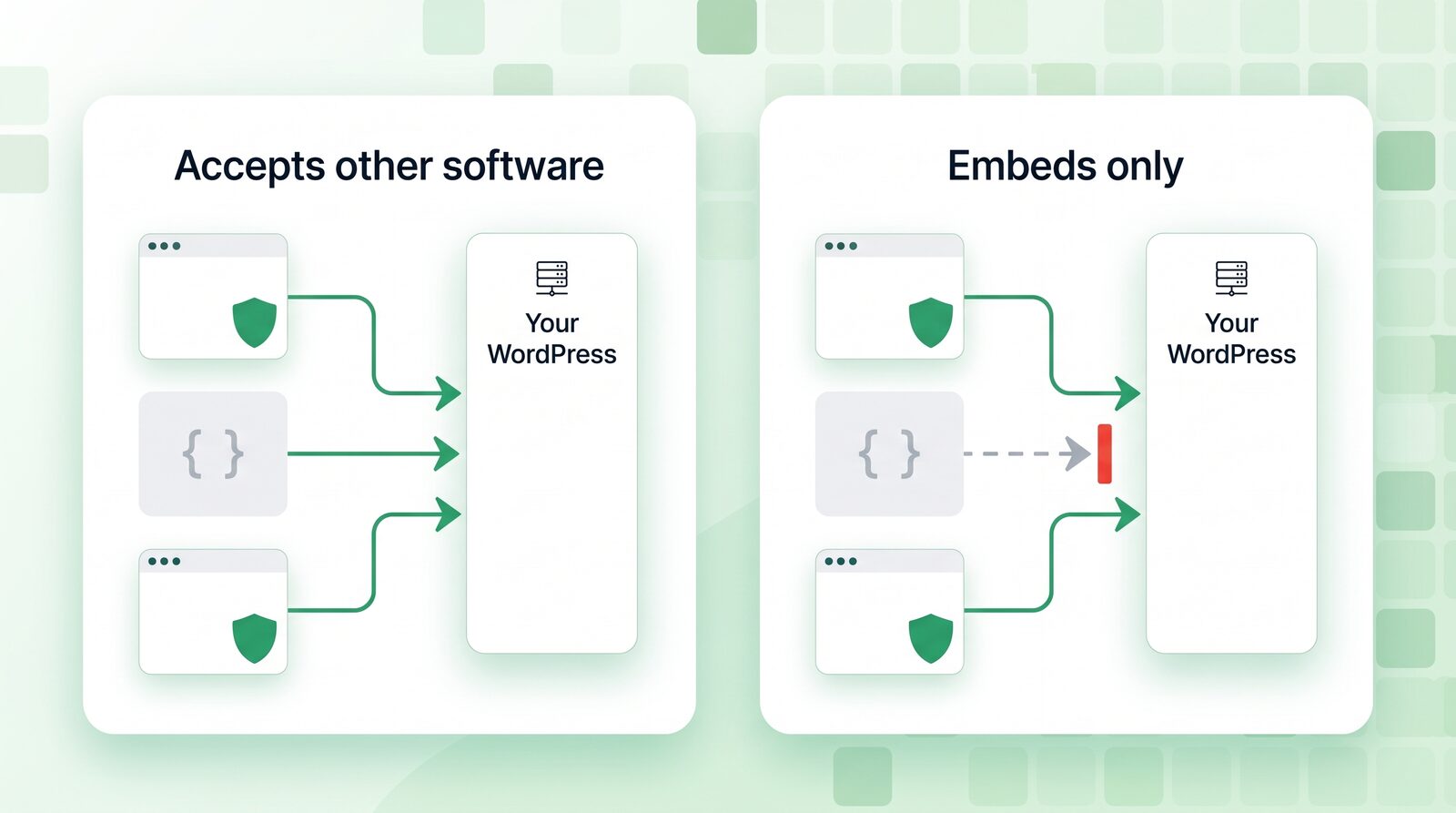
- Accept posts from other software (new in 2.3.4) is that switch. Off: only the form itself, on your pages and in its embeds, can submit, with token and proof-of-work every time. On: a headless app, a script or another server can post without those checks; protect it with a required header, which the embed itself doesn’t need.
- Forms that were already open to outside keep the switch on and work exactly as before. Forms you open from 2.3.4 start with it off.
- Form loads per visitor (Settings → Spam Protection, default 60 every 5 minutes) is the one number to raise when many people share an internet connection.
If you’ve tried to embed a WordPress form on another website, you’ll know the catch. Most of the spam protection in a form plugin assumes the form sits on the WordPress site that receives it. That’s the easy case: the page and the server know each other. The moment the form lives somewhere else (a Webflow marketing site, a client’s Wix page, an Astro or Hugo build, a React app) a lot of plugins quietly drop to “accept anything posted to this address”. Bots love that address.
Until 2.3.3, CraftForms did the same for any form you opened to other websites: the token and the proof-of-work only ran on your own pages. Version 2.3.4 closes that gap, renames the setting so it says what it does, and adds the one switch that makes it work without breaking anyone’s existing setup. Here are the cases, what each check does in them, and which settings to pick.
Which spam checks run on a CraftForms form?
Every CraftForms form has these, with no setup and nothing sent to another company:
| Check | What it does |
|---|---|
| Hidden trap field | A field people never see. Bots that fill in every field give themselves away. |
| Form token | When the form comes into view, it fetches a signed token from your site. A submission must bring it back: not sooner than 3 seconds after (people don’t type that fast), not later than 12 hours, and only once. |
| Proof-of-work | The token comes with a small puzzle the visitor’s browser solves while they type, about half a second on a laptop. A bot has to pay that for every message. How it works. |
| Rate limits | One visitor can send a form 10 times a minute, 30 forms in 5 minutes across the site, and one email address 5 times an hour. |
| Random-text filter | Gibberish names and messages get a normal thank-you, and nothing is saved or sent. |
| Cloudflare Turnstile | Optional, per form, off by default. The only check that involves another company. |
Proof-of-work is on for new sites. On a site that had forms before 2.3.3, switch it on in CraftForms → Settings → Spam Protection.
The token and the proof-of-work are the strong ones, because they only come from a real form running in a browser. Which submissions have to carry them is the whole question of this post.
Case 1: the form is on your own WordPress pages
This is the default. The form is on a page of the same site, and Allow on other websites is off. Every submission needs the token, the proof-of-work answer and the page’s security code, and the trap field must be empty. A request from anywhere else is refused before any of your submit actions run.
Nothing to set up. If all your forms live on your WordPress site, you can stop reading here.
Case 2: you embed the WordPress form on another website
You want the form on a site that isn’t WordPress: a Webflow or Wix page, a Framer landing page, a static Astro or Hugo build, a client’s site. In CraftForms PRO you do it in two steps:
- In the form editor, open Advanced Settings → Configure Submission Settings and turn on Allow on other websites.
- In CraftForms → Embed, create an embed key for that form and the website’s domain, and paste the two-line snippet into the other site.
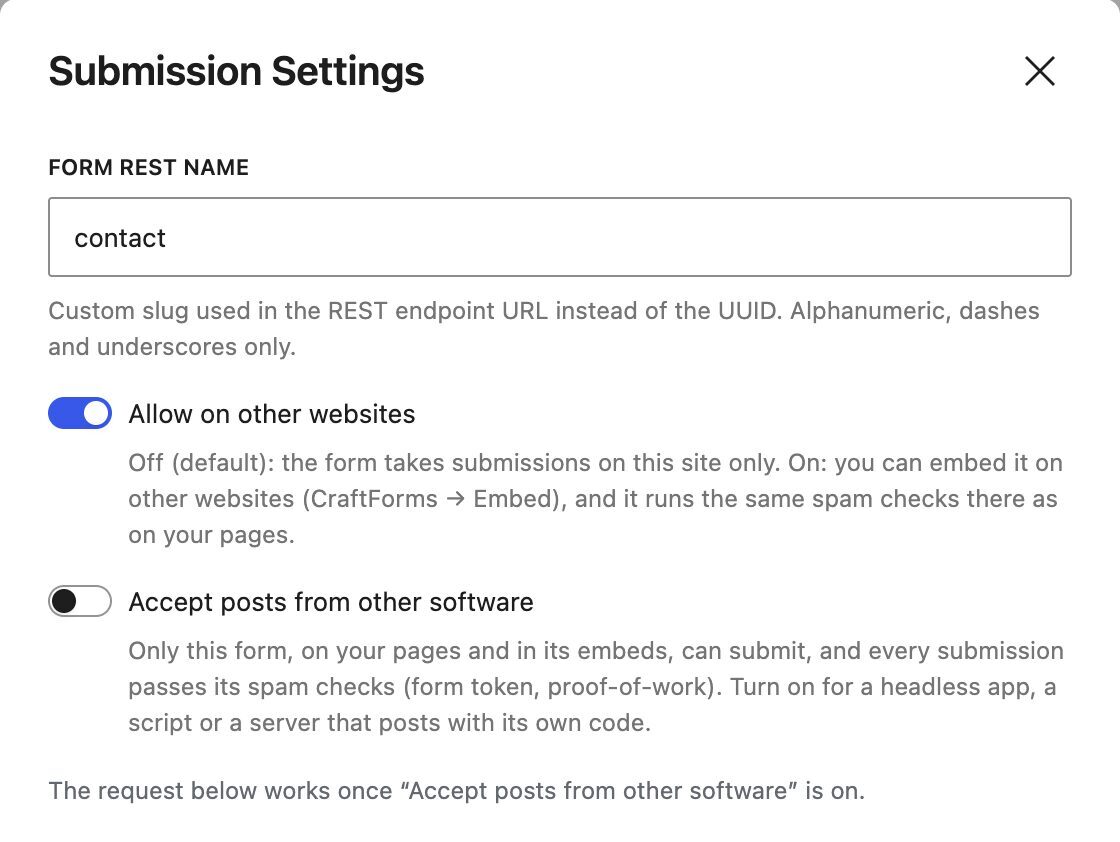
The embed key is tied to one form and one domain, so the form only loads on the website you named. An embed key can only be made for a form with Allow on other websites on, which is why step 1 comes first.
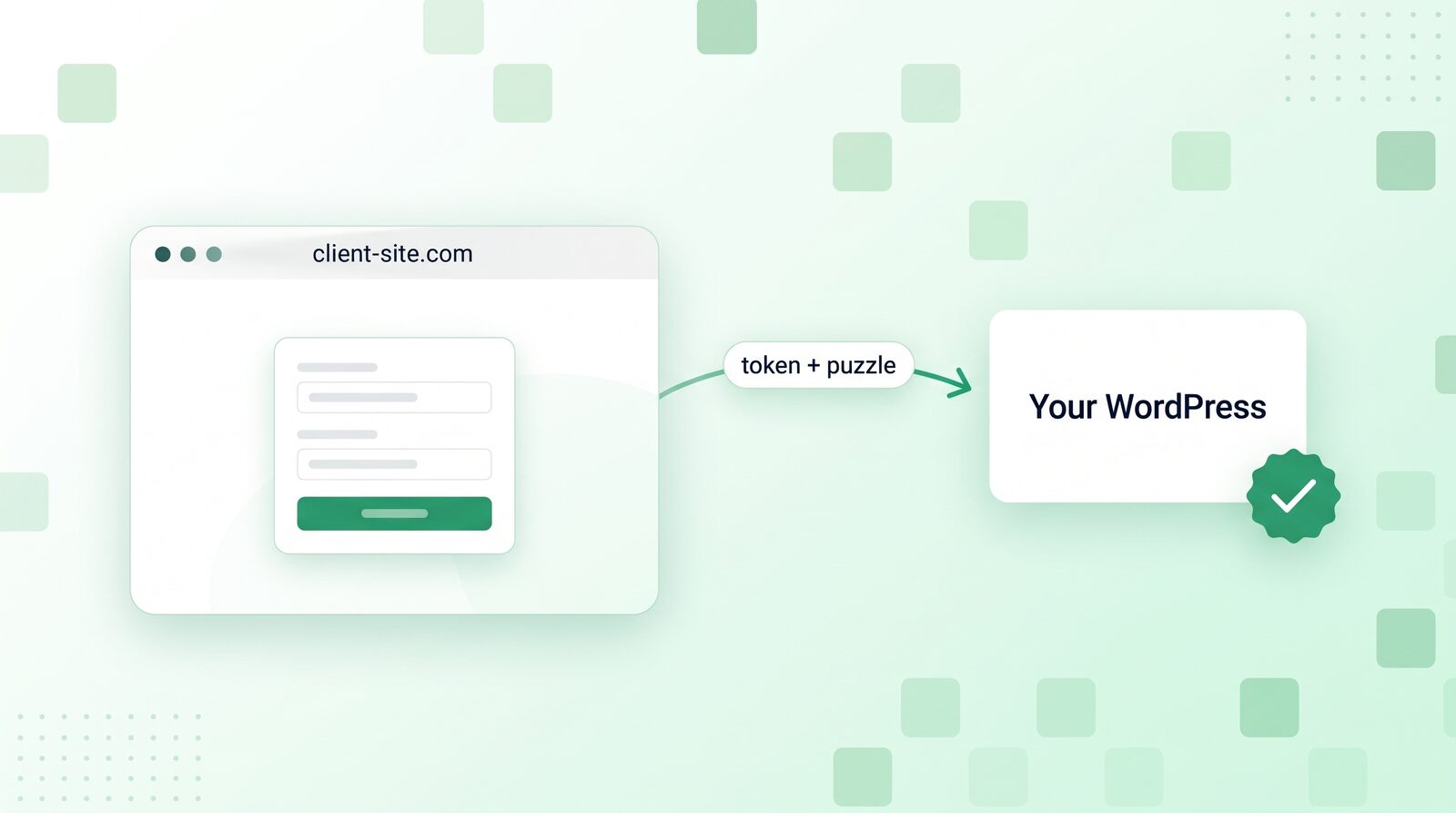
What’s new in 2.3.4 is what happens inside the embed. The embedded form now asks your WordPress site for its token, exactly as it does on your own page, and the visitor’s browser solves the proof-of-work puzzle in the background. Your site checks both when the form is sent. For the visitor nothing changes; for a bot, the embed is as expensive as your own contact page.
Case 3: your own code posts to the form
Sometimes there’s no embed at all. A headless frontend builds its own form and posts the fields to the CraftForms address. A booking app sends requests from its server. A Zapier-style tool forwards data. That’s other software: it never runs the CraftForms form, so it has no token and no puzzle to solve.
That’s what the new switch is for. Under Allow on other websites you now see Accept posts from other software:
- Off: only the form itself can submit, on your pages and in its embeds. A post without a valid token and proof-of-work answer is refused, whatever website it claims to come from.
- On: other software can post directly. Those posts skip the token and the proof-of-work (there’s nothing to check them against), and keep the trap field, rate limits, random-text filter and Turnstile if you use it.
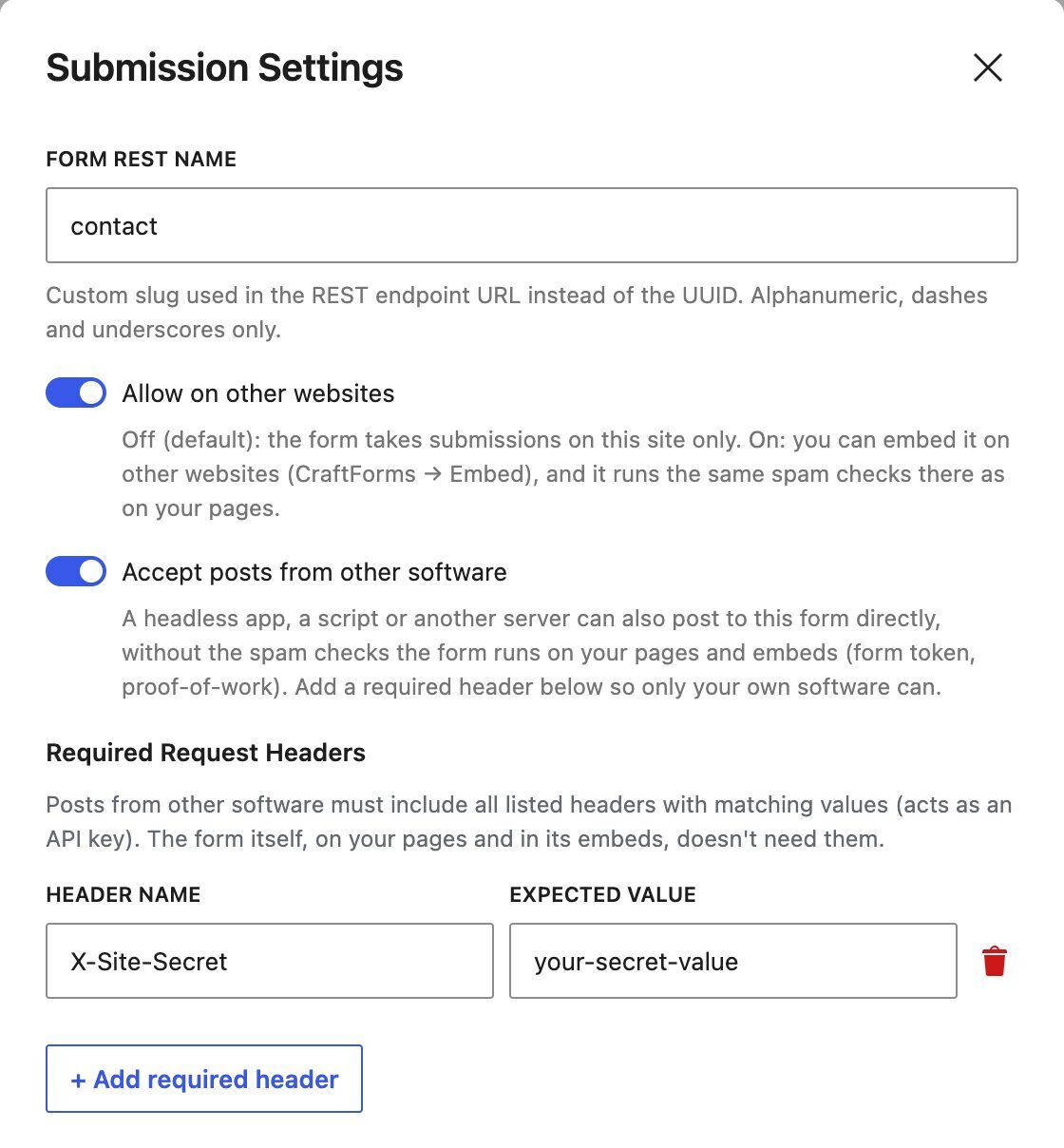
If you turn it on, add a Required Request Header in the same window (it only shows while the switch is on): a header name and a secret value your code sends with every request, such as X-Site-Secret. A post without it is refused. Treat the value like a password and keep it on your server, never in browser code.
The header is only for other software. The form itself, on your pages and in its embeds, doesn’t send it and doesn’t need it: it proves itself with its token, and on a form with a required header that token gets the full check, proof-of-work included. So one form can serve an embed and your own code, and neither gets the weaker deal.
Coming in CraftForms 2.4: a data API with its own keys for software that needs to send or read submissions, so this case gets a proper login instead of a shared header.
Will my existing embeds or headless forms break?
No. That was the rule for this release. A form that was open to other websites before 2.3.4 keeps Accept posts from other software on, so it behaves exactly as it did: your embeds work, your headless frontend works, your scripts work.
The new default only applies to forms you open to other websites from now on. Those start with the switch off, and so do forms the setup wizard makes when you choose to put them “on another website”. If one of those needs to take posts from your own code, turn the switch on.
Our advice for a form that is only ever embedded: open its Submission Settings and switch Accept posts from other software off. That’s the step that turns “an address anyone can post to” into “a form that has to be filled in”.
When should I raise “Form loads per visitor”?
Each time a form comes into view, it fetches one token from your site. One internet address can do that 60 times in 5 minutes by default. That’s plenty for one person, and it stops a bot from collecting tokens in bulk.
It can be too few when many people reach your site through one internet address at the same time:
- a school, a university or an office network
- hotel, conference or event Wi-Fi (a registration form on the big screen)
- some mobile networks, which put many phones behind one address
- a page that shows several forms at once, or a booking page people reload a lot
Over the limit, a visitor’s form can’t be sent until the 5 minutes pass, and they see a plain message about too many forms opened from their connection, not a spam error. Raise the number in CraftForms → Settings → Spam Protection → Form loads per visitor, every 5 minutes (from 10 up to 100,000). For an event with a few hundred people on one Wi-Fi, 500 to 1,000 is a sensible start.
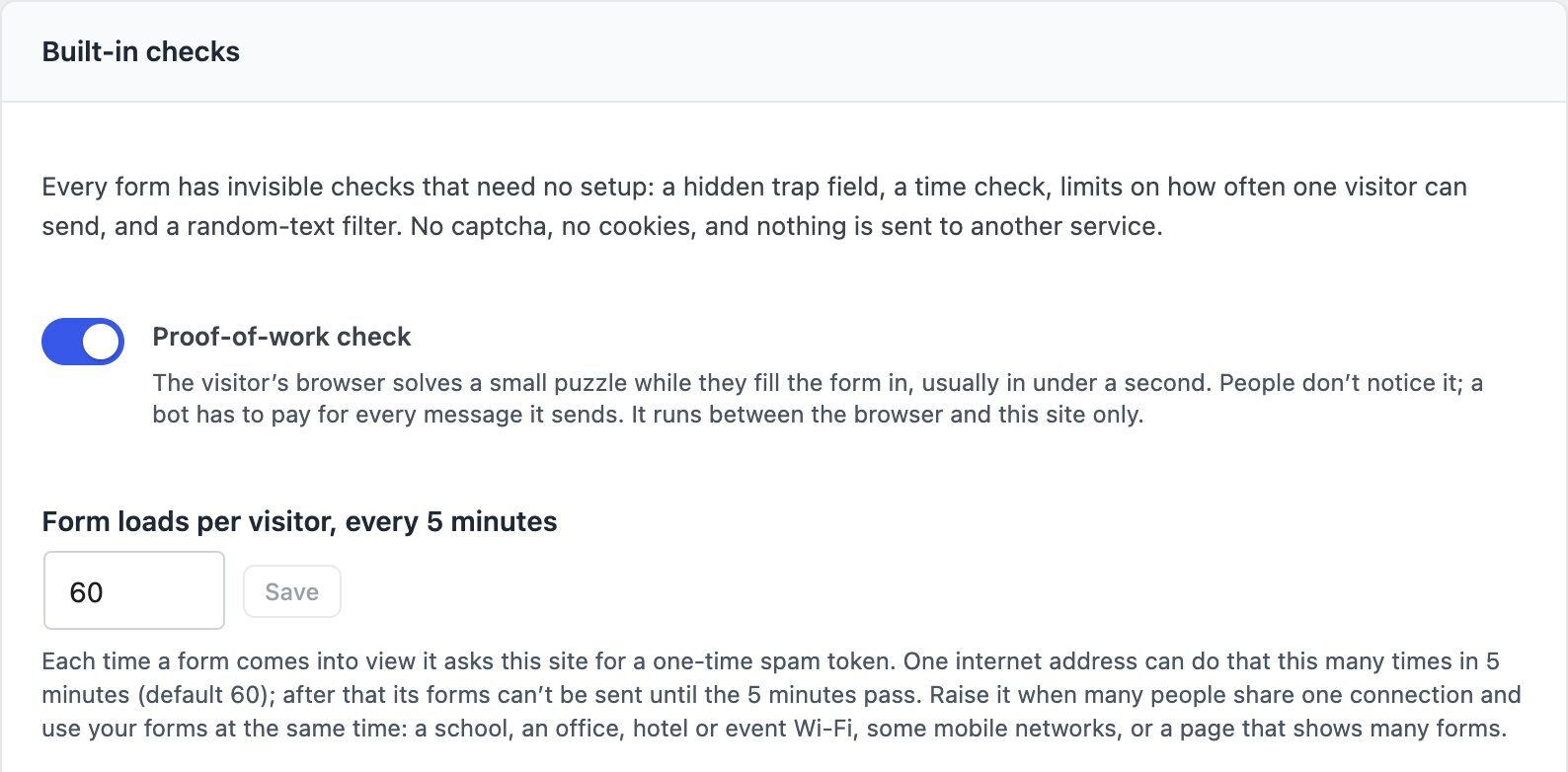
Developers can set it in code with the craftforms_form_token_rate_limit filter, per form if needed. Returning 0 switches the limit off; the token and the proof-of-work still apply.
Which settings should I choose?
| Your setup | Allow on other websites | Accept posts from other software |
|---|---|---|
| Form only on your WordPress pages | Off | (hidden) |
| Form embedded on other websites with the embed code | On | Off |
| Headless frontend or server code posts to it | On | On, plus a required header |
| Both an embed and your own code | On | On, plus a required header (the embed keeps its full checks) |
| Form opened before 2.3.4, nothing changed | On | On (as before) |
If a form has both an embed and your own code posting to it, the required header is what keeps them apart: your code sends the header, the embed sends its token, and a bot has neither.
How do I check it’s working?
CraftForms → Settings → Spam Protection shows how many spam submissions were blocked this month and last month, and why: trap field, no valid token, sent too fast, proof-of-work not solved, token used again, random text, too many submissions, Turnstile. After you switch an embedded form to embeds only, the “no valid token” line is where the bots that used to post straight to its address show up.
Want to see it for yourself? Send the form from the embed, then post the same fields to its address with a tool like curl. The first goes through; the second is refused with “This form takes submissions from its own page and its embeds only.”
Try it
CraftForms 2.3.4 brings the embed checks, the renamed setting and both new settings. Embedding and external submissions are part of CraftForms PRO; the built-in checks, proof-of-work included, are in the free plugin. Download CraftForms, then set up your first embed with the Embed guide. Developers will find every check, limit and filter in Submission Limits and Spam Protection. For the static-site side of things, see using WordPress as a locked-down form backend.
FAQ
Do I need to change anything after updating to 2.3.4?
No. Forms keep working as before; the setting you knew as Allow External Submissions is now called Allow on other websites. To get the stronger checks for an embedded form, switch its Accept posts from other software off.
Does proof-of-work slow the embedded form down?
No. The token and the puzzle start when the form comes into view and are solved in the background while the visitor types.
Does the embed send visitor data to a third party?
No. The embedded form talks only to your WordPress site. Only Cloudflare Turnstile, if you switch it on for a form, involves another company.
What does a visitor see if their submission is refused?
For a missing or old token, the form fetches a new one and tries again by itself. On a shared connection over the limit, they see a short message asking them to wait a few minutes.
Can my headless app still post to an embeds-only form?
No, that’s the point of the setting. Turn Accept posts from other software on for that form and add a required header. The embed keeps its token and proof-of-work checks and doesn’t need the header.