
A Captcha Alternative With No Third Party: Spam Protection That Stays on Your Site
- Category
- Article
- Published
- Updated
- Reading time
- 9 min
- Tags
The short answer: a proof-of-work check. The visitor’s browser solves a small maths puzzle that your own site handed out, while the visitor fills the form in. Your site checks the answer. No captcha to click, no cookie, and no request to Google, Cloudflare or any other company. CraftForms does this from version 2.3.3, free: on for new sites, and one switch away on sites you update.
TL;DR
- reCAPTCHA, hCaptcha and Cloudflare Turnstile all send the visitor’s IP address and browser data to a company outside your site. For many EU sites (clinics, therapists, lawyers) that’s the part they’d rather avoid.
- Proof-of-work needs no outside service. The puzzle and the answer travel only between the visitor’s browser and your WordPress site.
- In CraftForms the puzzle takes about half a second on a laptop and is solved in the background while the visitor types. People don’t notice it; a bot has to solve a new one for every message.
- Each solved puzzle is good for one accepted submission, so a bot can’t solve once and reuse it.
- It sits alongside the checks CraftForms already had: a hidden trap field, a 3-second time check, rate limits and a random-text filter.
- If a security plugin such as Shield Security blocks the WordPress REST API for visitors, forms now keep working anyway.
A recent r/Wordpress thread put the problem well. An agency with health and therapy clients in Germany and Austria had a contact form drowning in spam. Honeypots in their form builder didn’t stop it. Cloudflare Turnstile would, but they didn’t want visitor IP addresses going to a US company on a doctor’s website. Google reCAPTCHA was out for the same reason. What they asked for was simple: free, self-hosted, run by someone trustworthy, and good enough to stop bots that see through a hidden field but are “too stupid to solve a little question or do a crypto calculation”.
That last phrase is the whole idea behind proof-of-work. Here’s how it works, why it fits sites like that one, and how CraftForms does it.
Why do captchas send data to a third party?
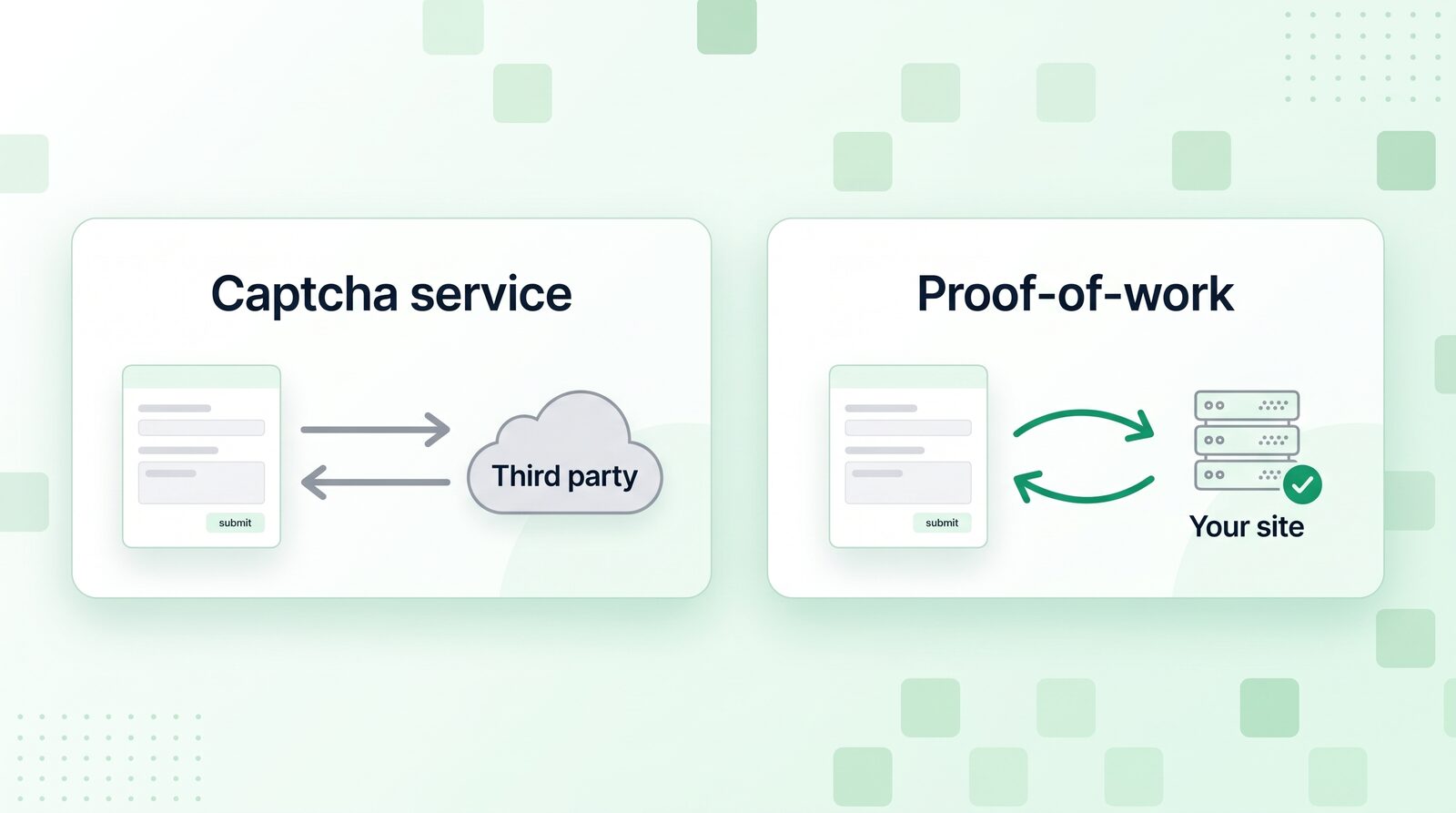
Because the check runs on someone else’s servers. reCAPTCHA, hCaptcha and Turnstile decide whether a visitor is human by looking at their IP address, browser, cookies and behaviour, on the provider’s side. That’s what makes them good at catching bots, and it’s also why each one is a data processor you have to name in your privacy policy and, for a US provider, justify the transfer for.
For a shop selling T-shirts, most site owners accept that. For a psychotherapist’s contact form, where even “this person wrote to a therapist” is sensitive, plenty of agencies would rather not. CraftForms won’t tell you what your data protection officer should decide. A check that sends nothing anywhere just leaves less to decide.
How does a proof-of-work check stop bots?
It makes every submission cost a little computing time. When the form comes into view, the browser fetches a puzzle from your site: a SHA-256 hash of a random value plus a secret number. To answer, the browser has to try numbers until it finds the one that produces the same hash. On average that’s around 150,000 tries.
For one person sending one message, that’s nothing: about half a second on a laptop, a bit longer on an older phone, done in a background thread while they’re still typing their name. For a bot sending thousands of messages, it adds up. And the cheapest bots, the ones that post straight to your form’s address without running a browser, can’t answer at all.
Your site checks an answer with a single calculation. It doesn’t store the puzzles either: the secret number is derived from the signed token the puzzle came with.
This is the same family of tools the thread recommended: ALTCHA (and OpenPorte, its free community fork), Cap and Friendly Captcha all use proof-of-work. They’re good choices, especially if your form plugin is on their supported list. The difference with CraftForms is that the check is part of the form plugin, so there’s nothing to connect and no second plugin to keep updated.
What CraftForms does on every form
From version 2.3.3, CraftForms forms have these checks with no setup (proof-of-work on new sites, or once you switch it on):
| Check | What it stops |
|---|---|
| Proof-of-work | bots that post without a browser, and bots that can’t afford one puzzle per message |
| Single-use token | a solved puzzle copied out of the page and replayed |
| Hidden trap field | bots that fill in every field they find |
| 3-second time check | submissions faster than a person can type |
| Rate limits | one visitor (10 per minute per form) or one email address (5 per hour) flooding a form |
| Random-text filter | gibberish like kFaUShXPAdhzUyKbS and j.o.h.n.s.m.i.t.h@gmail.com; the bot gets a normal thank-you, nothing is saved or sent |
None of them shows the visitor anything, sets a cookie, or sends data to another service. They’re all in the free plugin.
The token detail matters more than it sounds. Each form fetches a signed token when it comes into view, and from 2.3.3 a token is good for one accepted submission. A bot can’t solve one puzzle and then send the same answer a thousand times. The form fetches the next token by itself, so a real visitor who sends a second message, or books a second appointment, notices nothing. If a submission is refused because a field is missing, the token isn’t used up, so fixing the field and sending again works as usual.
Where to see it working
Go to CraftForms → Settings → Spam Protection. Under Built-in checks you’ll find the proof-of-work switch and how many spam submissions were blocked this month and last month, with the reason for each: trap field, no valid token, sent too fast, proof-of-work not solved, token used again, random text, too many submissions.
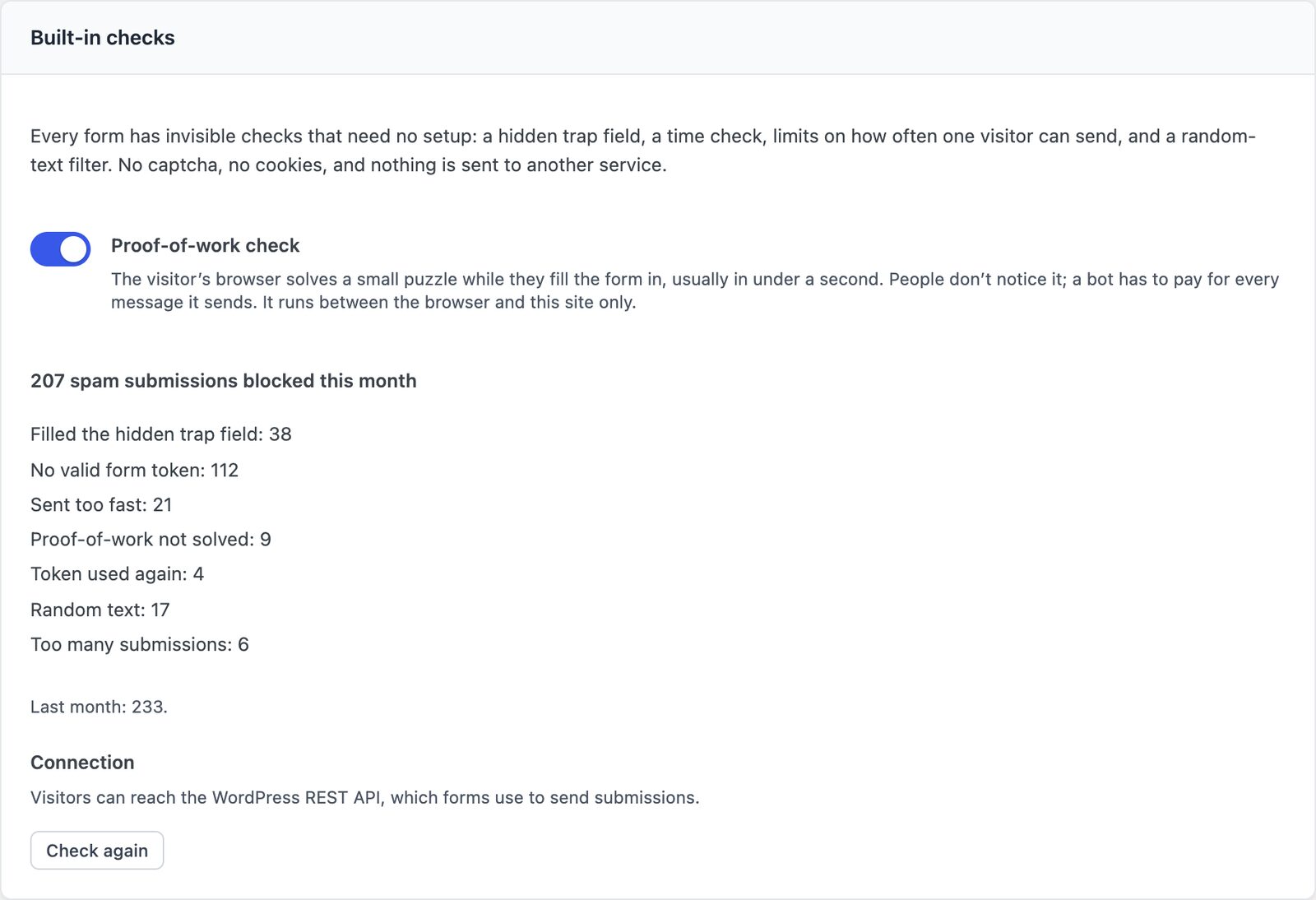
That count is the answer to the client who asks whether the spam protection actually does anything.
What if a security plugin blocks the REST API?
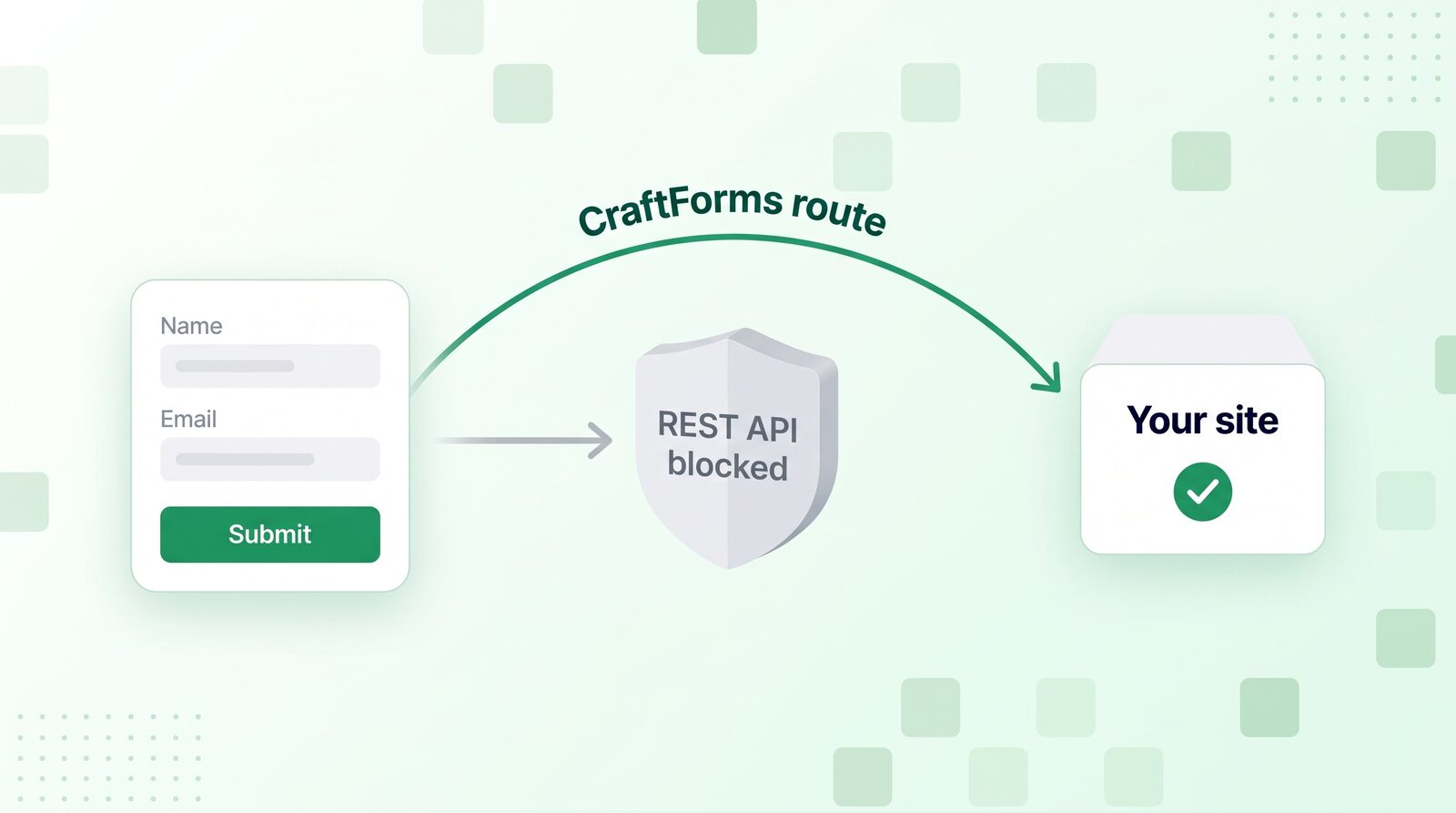
Most WordPress form plugins, CraftForms included, send submissions through the WordPress REST API (/wp-json/…). Security plugins such as Shield Security, All In One WP Security or Disable REST API can block it for visitors who aren’t logged in. The result is nasty to debug: the form works for you, logged in, and fails silently for everyone else. One of our customers ran into exactly that with Shield Security PRO.
From 2.3.3, CraftForms handles it by itself:
- Where the security plugin has an allowlist (Shield Security, All In One WP Security, Perfmatters, Disable REST API, Hide My WP Ghost), CraftForms adds its own addresses to it. Everything else stays blocked.
- Where it doesn’t, forms switch to CraftForms’ own route, which serves only CraftForms’ addresses, with the same checks.
- If a visitor’s browser runs into the block before the site has noticed, it retries on that route at once.
Settings → Spam Protection → Connection and Tools → Site Health tell you when this happens and which plugin is probably the cause.
Forms in popups no longer load until they’re opened
One more change in the same release, for forms you embed on other websites (PRO). An embedded form now loads when it comes into view. A form in an exit-intent popup that never opens doesn’t run its scripts at all. While the browser is idle, the files are downloaded in the background without running, so the form appears quickly when the popup does open. Forms that a popup builder adds to the page only when it opens load too.
Is this GDPR compliant?
That depends on your whole site, not on one form check, and no plugin can promise it for you. What we can say is what this check does: it sends no requests to third parties, sets no cookies, and stores nothing about the visitor. The puzzle and its answer travel only between the visitor’s browser and your server. The submission itself is stored on your WordPress site, like any form entry, so your privacy policy should still say what the form collects and why.
If you also switch on Cloudflare Turnstile for a form (it’s optional and off by default), that form does send data to Cloudflare. CraftForms says so on the settings screen.
Does it work with Elementor?
The checks protect CraftForms forms, not Elementor’s own Form widget or other form plugins. If your site is built with Elementor, place a CraftForms form with the [craftforms] shortcode in a Shortcode widget, and it brings all of these checks with it. Coming from Contact Form 7? Here’s how to move your forms over.
Can a determined bot still get through?
Yes, if someone points a real browser at your form and is willing to spend the computing time. Proof-of-work raises the price of spam; it doesn’t make it impossible, and neither does any captcha. That’s why it sits next to the trap field, time check, single-use tokens, rate limits and random-text filter rather than replacing them. For a form that’s still a target after all that, you can switch on Turnstile for that one form and keep the rest of the site free of third parties.
Try it
Proof-of-work arrives in CraftForms 2.3.3. It’s on for new sites; on a site you update, switch it on in Settings → Spam Protection. Download the free plugin, put a form on your contact page, and check Settings → Spam Protection in a week. Developers can tune the puzzle size and see every check in the Submission Limits and Spam Protection guide. For how the earlier behaviour checks work, see how CraftForms stops form spam without a captcha.
FAQ
Is the proof-of-work check free?
Yes. It’s in the free plugin, with no limit on submissions.
Will it slow my form down?
No. The puzzle is solved in a background thread while the visitor fills the form in. A laptop needs about half a second; an older phone a couple of seconds, and the form already waits 3 seconds before it accepts a submission. The solver itself is a 2 KB file that only loads when a form comes into view.
What happens to pages my cache stored before the update?
Nothing breaks. On a site that had forms before 2.3.3, the check stays off until you switch it on. When you do, CraftForms clears the page caches it knows about, and for 30 days a submission from a page cached earlier is still accepted. If your host or CDN caches pages, clear that cache too.
Can I switch it on or off?
Yes, in Settings → Spam Protection, or for one form with the craftforms_pow_enabled filter.
Does it work on forms embedded on other websites?
Not yet. Forms shown on another domain use their own external-submission settings (allowed domains and headers). Proof-of-work for those is planned.