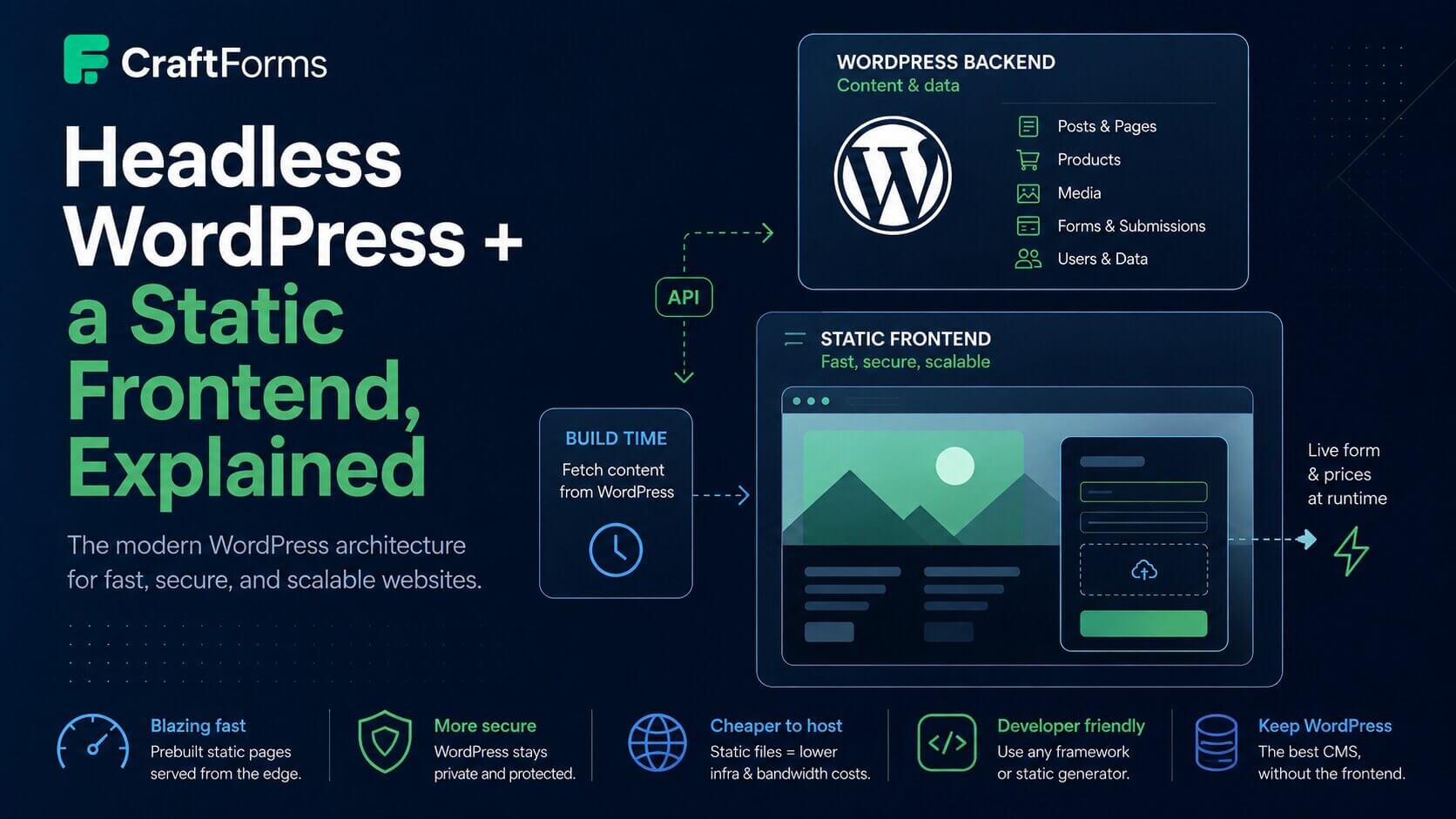
If you’ve ever described your setup as “headless WordPress with a static frontend” and watched another developer’s eyes narrow, you know this conversation:
“So you’re headless? Or is it just a frontend CMS? How does your static site actually get the data — is it prebuilt, or is it making API requests? I’m not sure what ‘the data comes from a CMS and I prebuild everything’ even means.”
Those are good questions, and the confusion is common. The terms get used loosely, and “headless” hides a couple of very different data-flow choices underneath it. This post untangles them — and then shows where forms and live prices fit, which is the part most explainers skip.
Coupled vs headless: two jobs, one tool or two
A traditional WordPress site does two jobs at once:
- Stores and manages content — posts, pages, products, media, users.
- Renders the pages — a theme + PHP turn that content into HTML on every request.
That’s the coupled model. It’s what people sometimes loosely call a “frontend CMS”: WordPress is both the database and the thing your visitors’ browsers talk to.
Headless splits those two jobs apart. WordPress keeps job #1 — it’s your content and data store, reachable over its REST or GraphQL API — and something else entirely does job #2. A separate frontend (Astro, Hugo, Next.js, plain HTML) pulls the content and renders the pages. Visitors never touch WordPress directly; they load a fast static site, and WordPress sits quietly in the back as the source of truth.
So “headless” just means: WordPress is the backend, a separate frontend is the face.
How does the frontend get the data? Two models — usually a hybrid
This is the part that trips people up, because “headless” doesn’t answer it by itself. There are two ways a decoupled frontend can get its data, and most real sites use both.
1. Prebuilt at build time (static generation). Your generator (Astro, Hugo, Next in SSG mode) calls the WordPress API once, at build time, pulls all the content, and bakes it into finished HTML pages. Those pages are then served as flat files from a CDN — no WordPress, no database, no PHP in the request path. This is what “I’m prebuilding pages for everything” means. It’s blisteringly fast and dirt cheap to host. The trade-off: the pages are a snapshot. Content changes in WordPress don’t appear until you rebuild.
You don’t need a separate framework to land in this same model, either — WordPress can do its own building. Builderius builds the site visually, inside Gutenberg, and exports it straight to static HTML/CSS/JS, so WordPress is the CMS and the generator at once (that’s the stack behind the Builderius + CraftForms walkthrough linked below). Simply Static comes at it from the other direction: point it at a WordPress site you already have, running whatever theme, and it crawls every page and writes out the flat-file equivalent. Both land in exactly the same place as Astro/Hugo/Next in SSG mode — content baked in at build/export time — just with WordPress doing the rendering itself instead of an external generator calling its API.
2. Runtime API requests. The page loads, and then JavaScript in the browser fetches live data from an API and fills part of the page in. This is for the bits that must be current — the parts you can’t afford to have go stale between builds.
For a real-world example of this model taken to its full extent — not a dynamic island on an otherwise static page, but an entire frontend built this way — see setting up WordPress as a scalable headless CMS for a knowledge-base project: one WordPress backend exposes custom REST endpoints (a /sitemap/ listing and a /get_item/ content lookup) that five separately branded React frontends call live, rather than baking content into each at build time. It’s a good illustration of why you’d reach for pure runtime fetching instead of the hybrid below: one CMS, several frontends, content that has to stay current across all of them without rebuilding five sites every time something changes.
Almost every good headless site is a hybrid: the bulk of the page is prebuilt and static (fast, cheap, cached at the edge), with a few dynamic islands that fetch live data at runtime. You don’t choose one model for the whole site — you choose per piece of content, based on how fresh it needs to be.
That reframing is the whole game: what actually has to be live, and what can be frozen? For most sites, the answer is “95% can be frozen.” The interesting question is what to do with the other 5%.
Where forms and prices fit
A form — especially a product configurator with a live price — is the textbook dynamic island. It’s the exact 5% that can’t be baked into a static file:
- A contact or booking form needs to submit somewhere and store the result. A flat HTML page has no server to receive it.
- A product price that depends on the options a customer picks has to be computed as they pick, and it has to reflect current pricing — not whatever the price was the last time you rebuilt.
- A checkout or payment step needs a server that can be trusted with the final number — the browser can display a total, but it can’t be the thing that charges a card or confirms a booking slot is still free.
“Form” ends up covering a wide range here — a two-field contact form and a multi-step product configurator with live pricing and payment are the same shape of dynamic island, just with more happening inside it.
This is precisely what CraftForms is built for in a headless setup. The shape looks like this:
- The page is prebuilt and static. Title, images, copy, specs — all frozen, all served from the edge, instant.
-
The form is a runtime island. You drop a tiny placeholder into the static page. On load, a small script (
embed.js) fetches the live form from your WordPress backend (GET /craftforms/v1/embed/{key}) and boots it in place. Because it’s fetched fresh every visit, editing fields or prices in WordPress needs no rebuild. - The price computes in the browser. As the customer changes options, the price recalculates instantly — locally, with no network call.
- The backend is touched only on submit. When they finally submit, the request goes to WordPress, which re-verifies everything and stores it.
Nothing about the form lives in the static build, so the frontend stays a pile of flat files and the form still behaves like a real, live application.
Why it’s always fast
Here’s the framing that makes this click — and it’s the reason developers keep arriving at exactly this setup once they see it work:
There are no backend calls while the customer is using the form. They open a product page (already instant — it’s static). They toggle options, change quantities, add extras — and the price updates on every change with zero round-trips, because the math runs in their browser. The only time the backend is hit is the final submit.
Compare that to a server-rendered configurator, where every option change is a request to the server, a database read, a recompute, and a response — a little spinner on every click, and a page that’s only as fast as your slowest query and the user’s latency. In the static + runtime-island shape, the slow part (the server) is out of the interaction loop entirely. It does almost nothing per pageview: it answers one embed request when the form loads, and one submission when the customer is done.
Static page + client-side price + submit-only backend = a configurator that feels instant, on hosting that costs almost nothing.
The dual price engine (how the price stays honest)
“Compute the price in the browser” should set off an alarm: anything in the browser can be edited. If the price is only calculated client-side, a user can open devtools and submit whatever total they like.
CraftForms runs the price formula on both sides:
- Client-side, in JavaScript (a port of Symfony’s Expression Language), for the instant feedback that makes a static page feel live.
-
Server-side, in a PHP mirror of the same pipeline (
class-formula-evaluator.php), which re-computes the total on submit from the form’s own formulas and current option prices. If the submitted price doesn’t match, the submission is rejected.
So the browser side is for feel and the server side is for trust. The customer gets an instant price; you get a total you can actually charge, because the number that matters is recomputed where the user can’t touch it.
An honest word on abuse
Because the submission endpoint is public (that’s what lets a static site reach it), it’s worth being straight about the current protections:
- Embed keys are bound to a domain — the backend checks the request
Originand refuses others. - Server-side re-verification (above) means price, stock, and booking capacity can’t be tampered with.
- You can require a custom request header on the form as a lightweight shared-secret spam gate.
- On the WordPress side, a one-click Headless backend mode toggle (CraftForms → Settings → Embed) closes everything but the CraftForms endpoints — public pages, the REST API, XML-RPC — so the install behaves like an API, not a website.
(One small implementation note if you go build this: the embed key encodes your WordPress URL so embed.js can find your backend on its own, but the framework starters still pass the WP URL explicitly in config — so you’ll set it in one obvious place, not dig it out of the key.)
Where to go next
That’s the concept. If you want the stack-specific walkthroughs:
- Astro → Add a Real Form Backend to Your Astro Site
- Hugo → Add Forms to a Hugo Site With a WordPress Backend
- Builderius (build the static site in WordPress) → Generate a Static Site from WordPress — With Forms That Actually Work
- Big catalog, prices that change daily → Static Catalog, Live Prices
- Coming from Formspree/Netlify Forms → When You Outgrow Hosted Form Endpoints
- Locking the backend down → Use WordPress as a Locked-Down Form Backend for Static Sites
The pattern is the same across all of them: keep the frontend static and fast, treat the form as a live island, compute prices in the browser for feel and on the server for trust, and touch the backend only when there’s actually something to submit.
CraftForms embedding and external submissions are CraftForms PRO features.